ISC Kea DHCP and Stork Training Notes (Heise Workshop, June 2026)
1 PDF Training Notes
2 PDF Slides
3 Info: Tools for working with JSON data (e.g. Kea DHCP config files)
3.1 JSON Editors
- JSON Hero https://jsonhero.io
- JSON Online Editor https://jsoneditoronline.org/
- JSON Viewer http://jsonviewer.stack.hu/
- JSON Lite - Firefox Browser Plugin https://addons.mozilla.org/en-US/firefox/addon/json-lite/?src=search
- Monaco Editor https://microsoft.github.io/monaco-editor/index.html
3.2 VIM JSON Syntax Highlighting
- In
vim, you can turn on syntax highlighting for JSON in the command mode with: set syntax=json - Set JSON highlighting when starting
vim% alias vimj='vim -c "set syntax=json"'
3.3 EMACS JSON Mode
- https://www.emacswiki.org/emacs/JSON
- Enable JSON-Mode in Emacs with
ESC-X json-mode<enter> - Re-format a JSON file with
CTRL+c-CTRL+f
4 Kea DHCP Labs
4.1 ISC-KEA-DHCP Basic configuration
4.1.1 Add Cloudsmith repos for ISC-Kea
- We work on the primary Kea-DHCP Server
keaNNNa.dane.onl - Start a root-shell
$ sudo -i
- Install puplic GPG keys used to verify the packages
% apt install -y debian-keyring apt-transport-https debian-archive-keyring % keyring_location=/usr/share/keyrings/isc-kea-3-0-archive-keyring.gpg % curl -1sLf 'https://dl.cloudsmith.io/public/isc/kea-3-0/gpg.B16C44CD45514C3C.key' | gpg --dearmor >> ${keyring_location} % chmod 644 ${keyring_location} - Download the repo information
% curl -1sLf 'https://dl.cloudsmith.io/public/isc/kea-3-0/config.deb.txt?distro=debian&codename=trixie&component=main' > \
  /etc/apt/sources.list.d/isc-kea-3-0.list
% chmod 644 /etc/apt/sources.list.d/isc-kea-3-0.list
% apt update
4.1.2 Install the Kea-DHCP Server
- Install Kea-DHCP binaries
% apt install isc-kea
4.2 Kea DHCPv6/DHCPv4 Server
4.2.1 A simple DHCPv6 Server configuration
- Work on the primary Kea-DHCP Server
keaNNNa.dane.onl - Make a backup copy of the original Kea-DHCP6 configuration file
% mv /etc/kea/kea-dhcp6.conf /etc/kea/kea-dhcp6.orig
- Create the Kea DHCP Server configuration file
/etc/kea/kea-dhcp6.conf. Change the IPv6 address in the interface configuration to the IPv6 address of the VM machine. Usehostname -Ito find the address.
{
    "Dhcp6": {
        "interfaces-config": {
            "interfaces": [
                "eth0/2001:db8:100::zzzz" # <-- change this to the IPv6 address of the machine
            ]
        },
        "lease-database": {
            "type": "memfile",
            "persist": true,
            "name": "/var/lib/kea/dhcp6.leases"
        },
        "subnet6": [
            {
                "subnet": "fd00:100::/64",
		"id": 1000,
                "pools": [
                    {
                        "pool": "fd00:100::1-fd00:100::ffff"
                    }
                ]
            },
            {
                "subnet": "fd00:200::/64",
		"id": 2000,
                "pools": [
                    {
                        "pool": "fd00:200::1-fd00:200::ffff"
                    }
                ]
            }
        ]},
        "loggers": [
            {
                "name": "kea-dhcp6",
                "output_options": [
                    {
                        "output": "/var/log/kea/kea-dhcp6.log"
                    }
                ],
                "severity": "INFO",
                "debuglevel": 0
            }
        ]
    }
}
- Check the syntax of the Kea DHCP4 configuration file. This time, the Kea-DHCP6 syntax check should return with an error
% kea-dhcp6 -t /etc/kea/kea-dhcp6.conf
2026-05-31 07:03:56.316 WARN  [kea-dhcp6.dhcp6/13333.139903392525376] DHCP6_CONFIG_SYNTAX_WARNING configuration syntax warning: /etc/kea/kea-dhcp6.conf:32.11: Extraneous comma. A piece of configuration may have been omitted.
Syntax check failed with: /etc/kea/kea-dhcp6.conf:33.9-17: syntax error, unexpected constant string, expecting "," or }
- Try to find and fix the error and check again. Solution: ( The "]}," before "loggers" has one extra "}", needs to be replaced with "]," )
- Successful Syntax check
% kea-dhcp6 -t /etc/kea/kea-dhcp6.conf
2026-05-31 07:04:35.008 WARN  [kea-dhcp6.dhcpsrv/13341.140495060110400] DHCPSRV_MT_DISABLED_QUEUE_CONTROL disabling dhcp queue control when multi-threading is enabled.
2026-05-31 07:04:35.008 WARN  [kea-dhcp6.dhcp6/13341.140495060110400] DHCP6_RESERVATIONS_LOOKUP_FIRST_ENABLED Multi-threading is enabled and host reservations lookup is always performed first.
2026-05-31 07:04:35.008 INFO  [kea-dhcp6.dhcpsrv/13341.140495060110400] DHCPSRV_CFGMGR_NEW_SUBNET6 a new subnet has been added to configuration: fd00:100::/64 with params: valid-lifetime=7200, rapid-commit is false
2026-05-31 07:04:35.008 INFO  [kea-dhcp6.dhcpsrv/13341.140495060110400] DHCPSRV_CFGMGR_NEW_SUBNET6 a new subnet has been added to configuration: fd00:200::/64 with params: valid-lifetime=7200, rapid-commit is false
2026-05-31 07:04:35.009 INFO  [kea-dhcp6.dhcpsrv/13341.140495060110400] DHCPSRV_CFGMGR_SOCKET_TYPE_SELECT using socket type raw
2026-05-31 07:04:35.009 INFO  [kea-dhcp6.dhcpsrv/13341.140495060110400] DHCPSRV_CFGMGR_USE_UNICAST listening on unicast address 2a03:b0c0:3:f0:0:2:7751:e000, on interface eth0
2026-05-31 07:04:35.009 INFO  [kea-dhcp6.dhcpsrv/13341.140495060110400] DHCPSRV_LEASE_MGR_BACKENDS_REGISTERED the following lease backend types are available: memfile
2026-05-31 07:04:35.009 INFO  [kea-dhcp6.hosts/13341.140495060110400] HOSTS_BACKENDS_REGISTERED the following host backend types are available:
2026-05-31 07:04:35.009 INFO  [kea-dhcp6.dhcpsrv/13341.140495060110400] DHCPSRV_FORENSIC_BACKENDS_REGISTERED the following forensic backend types are available:
2026-05-31 07:04:35.009 INFO  [kea-dhcp6.database/13341.140495060110400] CONFIG_BACKENDS_REGISTERED the following config backend types are available:
- (Re-)Start the Kea DHCPv6 server module via systemd
% systemctl restart isc-kea-dhcp6-server
- Check the status of the service
% systemctl status isc-kea-dhcp6-server
 * isc-kea-dhcp6-server.service - Kea DHCPv4 Service
     Loaded: loaded (/usr/lib/systemd/system/isc-kea-dhcp6-server.service; disabled; preset: enabled)
     Active: active (running) since Sat 2026-05-30 14:08:40 UTC; 2min 2s ago
 Invocation: 956a332d17c94910a5702aff0ae68b9e
       Docs: man:kea-dhcp6(8)
   Main PID: 46849 (kea-dhcp6)
      Tasks: 6 (limit: 506)
     Memory: 2.7M (peak: 2.9M)
        CPU: 60ms
     CGroup: /system.slice/isc-kea-dhcp6-server.service
             |-46849 /usr/sbin/kea-dhcp6 -c /etc/kea/kea-dhcp6.conf

May 31 07:05:58 kea001a systemd[1]: Started isc-kea-dhcp6-server.service - Kea DHCPv6 Service.
May 31 07:05:58 kea001a kea-dhcp6[13363]: 2026-05-31 07:05:58.864 INFO  [kea-dhcp6.dhcp6/13363.140540406717504] DHCP6_STARTING Kea DHCPv6 server version 3.0.3 (stable) starting
May 31 07:05:58 kea001a kea-dhcp6[13363]: 2026-05-31 07:05:58.865 INFO  [kea-dhcp6.commands/13363.140540406717504] COMMAND_RECEIVED Received command 'config-set'
- Observer the Kea-DHCP6 logfile
% tail -f /var/log/kea/kea-dhcp6.log
4.2.2 DHCP Client
- Work on the DHCP-Client VM machine
- Become
root[dhcp]$ sudo -s
- Install the ISC-DHCP relay and client. Anwer all installation
questions with
ENTER.[dhcp]% apt install isc-dhcp-relay isc-dhcp-client [dhcp]% systemctl stop isc-dhcp-relay
- Create a virtual ethernet subnet using veth network interfaces (virtual ethernet)
[dhcp]% ip link add client-veth0 type veth peer name relay-veth0
[dhcp]% ip addr add fd00:100::ffff/64 dev relay-veth0
[dhcp]% ip link set dev relay-veth0 up
[dhcp]% ip link set dev client-veth0 up
- Manually start the ISC DHCP relay agent for DHCPv6
[dhcp]% dhcrelay -6 -d -l relay-veth0 -u <ipv6-addr-of-kea-server>%eth0
- Manually start the ISC DHCP client
[dhcp]% dhclient -d -6 client-veth0
Internet Systems Consortium DHCP Client 4.4.3-P1
Copyright 2004-2022 Internet Systems Consortium.
All rights reserved.
For info, please visit https://www.isc.org/software/dhcp/

Listening on Socket/client-veth0
Sending on   Socket/client-veth0
Created duid "\000\001\000\0011\256\234\352\322\307\366\330\325\177".
PRC: Soliciting for leases (INIT).
XMT: Forming Solicit, 0 ms elapsed.
XMT:  X-- IA_NA f6:d8:d5:7f
XMT:  | X-- Request renew in  +3600
XMT:  | X-- Request rebind in +5400
XMT: Solicit on client-veth0, interval 1060ms.
RCV: Advertise message on client-veth0 from fe80::2c97:e5ff:fe13:a902.
RCV:  X-- IA_NA f6:d8:d5:7f
RCV:  | X-- starts 1780211819
RCV:  | X-- t1 - renew  +2250
RCV:  | X-- t2 - rebind +3600
RCV:  | X-- [Options]
RCV:  | | X-- IAADDR fd00:100::1
RCV:  | | | X-- Preferred lifetime 4500.
RCV:  | | | X-- Max lifetime 7200.
RCV:  X-- Server ID: 00:01:00:01:31:ae:9a:56:d6:2e:ca:8b:c8:c3
RCV:  Advertisement recorded.
PRC: Selecting best advertised lease.
PRC: Considering best lease.
PRC:  X-- Initial candidate 00:01:00:01:31:ae:9a:56:d6:2e:ca:8b:c8:c3 (s: 10103, p: 0).
XMT: Forming Request, 0 ms elapsed.
XMT:  X-- IA_NA f6:d8:d5:7f
XMT:  | X-- Requested renew  +3600
XMT:  | X-- Requested rebind +5400
XMT:  | | X-- IAADDR fd00:100::1
XMT:  | | | X-- Preferred lifetime +7200
XMT:  | | | X-- Max lifetime +7500
XMT:  V IA_NA appended.
XMT: Request on client-veth0, interval 910ms.
RCV: Reply message on client-veth0 from fe80::2c97:e5ff:fe13:a902.
RCV:  X-- IA_NA f6:d8:d5:7f
RCV:  | X-- starts 1780211820
RCV:  | X-- t1 - renew  +2250
RCV:  | X-- t2 - rebind +3600
RCV:  | X-- [Options]
RCV:  | | X-- IAADDR fd00:100::1
RCV:  | | | X-- Preferred lifetime 4500.
RCV:  | | | X-- Max lifetime 7200.
RCV:  X-- Server ID: 00:01:00:01:31:ae:9a:56:d6:2e:ca:8b:c8:c3
PRC: Bound to lease 00:01:00:01:31:ae:9a:56:d6:2e:ca:8b:c8:c3.
PRC: Renewal event scheduled in 2250 seconds, to run for 1350 seconds.
PRC: Depreference scheduled in 4500 seconds.
PRC: Expiration scheduled in 7200 seconds.
- IPv6 Address configured on the
client-veth0interface[dhcp]% ip addr show dev client-veth0 5: client-veth0@relay-veth0: <BROADCAST,MULTICAST,UP,LOWER_UP> mtu 1500 qdisc noqueue state UP group default qlen 1000 link/ether d2:c7:f6:d8:d5:7f brd ff:ff:ff:ff:ff:ff inet6 fd00:100::1/128 scope global dynamic valid_lft 7187sec preferred_lft 4487sec inet6 fe80::d0c7:f6ff:fed8:d57f/64 scope link proto kernel_ll valid_lft forever preferred_lft forever - Log-Output on the DHCPv6 relay agent (The message
Can't process
   packet from interface 'client-veth0'.
is an artifact of the lab environment and can be ignored in this lab setup).Internet Systems Consortium DHCP Relay Agent 4.4.3-P1 Copyright 2004-2022 Internet Systems Consortium. All rights reserved. For info, please visit https://www.isc.org/software/dhcp/ Bound to *:547 Listening on Socket/client-veth0 Sending on Socket/client-veth0 Listening on Socket/eth1 Sending on Socket/eth1 Listening on Socket/eth0 Sending on Socket/eth0 Listening on Socket/relay-veth0 Sending on Socket/relay-veth0 Can't process packet from interface 'client-veth0'. Relaying Solicit from fe80::d0c7:f6ff:fed8:d57f port 546 going up. Relaying Advertise to fe80::d0c7:f6ff:fed8:d57f port 546 down. Can't process packet from interface 'client-veth0'. Relaying Request from fe80::d0c7:f6ff:fed8:d57f port 546 going up. Relaying Reply to fe80::d0c7:f6ff:fed8:d57f port 546 down.
- Log output on the Kea-DHCPv6 Server:
2026-05-31 07:16:59.542 INFO  [kea-dhcp6.dhcp6/13363.140540358358720] DHCP6_QUERY_LABEL received query: duid=[00:01:00:01:31:ae:9c:ea:d2:c7:f6:d8:d5:7f], [no hwaddr info], tid=0x14dc4e
2026-05-31 07:16:59.542 INFO  [kea-dhcp6.packets/13363.140540358358720] DHCP6_PACKET_RECEIVED duid=[00:01:00:01:31:ae:9c:ea:d2:c7:f6:d8:d5:7f], [no hwaddr info], tid=0x14dc4e: SOLICIT (type 1) received from 2a03:b0c0:3:f0:0:2:7752:
2000 to 2a03:b0c0:3:f0:0:2:7751:e000 on interface eth0
2026-05-31 07:16:59.542 INFO  [kea-dhcp6.leases/13363.140540358358720] DHCP6_LEASE_ADVERT duid=[00:01:00:01:31:ae:9c:ea:d2:c7:f6:d8:d5:7f], [no hwaddr info], tid=0x14dc4e: lease for address fd00:100::1 and iaid=4141405567 will be a
dvertised
2026-05-31 07:16:59.542 INFO  [kea-dhcp6.packets/13363.140540358358720] DHCP6_PACKET_SEND duid=[00:01:00:01:31:ae:9c:ea:d2:c7:f6:d8:d5:7f], [no hwaddr info], tid=0x14dc4e: trying to send packet ADVERTISE (type 2) from [2a03:b0c0:3:
f0:0:2:7751:e000]:547 to [2a03:b0c0:3:f0:0:2:7752:2000]:547 on interface eth0
2026-05-31 07:17:00.597 INFO  [kea-dhcp6.dhcp6/13363.140540358358720] DHCP6_QUERY_LABEL received query: duid=[00:01:00:01:31:ae:9c:ea:d2:c7:f6:d8:d5:7f], [no hwaddr info], tid=0xd89f32
2026-05-31 07:17:00.597 INFO  [kea-dhcp6.packets/13363.140540358358720] DHCP6_PACKET_RECEIVED duid=[00:01:00:01:31:ae:9c:ea:d2:c7:f6:d8:d5:7f], [no hwaddr info], tid=0xd89f32: REQUEST (type 3) received from 2a03:b0c0:3:f0:0:2:7752:2000 to 2a03:b0c0:3:f0:0:2:7751:e000 on interface eth0
2026-05-31 07:17:00.598 INFO  [kea-dhcp6.leases/13363.140540358358720] DHCP6_LEASE_ALLOC duid=[00:01:00:01:31:ae:9c:ea:d2:c7:f6:d8:d5:7f], [no hwaddr info], tid=0xd89f32: lease for address fd00:100::1 and iaid=4141405567 has been allocated for 7200 seconds
2026-05-31 07:17:00.598 INFO  [kea-dhcp6.packets/13363.140540358358720] DHCP6_PACKET_SEND duid=[00:01:00:01:31:ae:9c:ea:d2:c7:f6:d8:d5:7f], [no hwaddr info], tid=0xd89f32: trying to send packet REPLY (type 7) from [2a03:b0c0:3:f0:0:2:7751:e000]:547 to [2a03:b0c0:3:f0:0:2:7752:2000]:547 on interface eth0
- Kea-DHCP DHCPv6 Lease-file on the server side
[kea-server]% cat /var/lib/kea/dhcp6.leases
address,duid,valid_lifetime,expire,subnet_id,pref_lifetime,lease_type,iaid,prefix_len,fqdn_fwd,fqdn_rev,hostname,hwaddr,state,user_context,hwtype,hwaddr_source,pool_id
fd00:100::1,00:01:00:01:31:ae:9c:ea:d2:c7:f6:d8:d5:7f,7200,1780219020,1000,4500,0,4141405567,128,0,0,,d2:c7:f6:d8:d5:7f,0,,1,2,0
4.3 Kea-DHCP-Server REST API and dynamic reconfiguration
4.3.1 Configuring the Kea Control socket
- We work on the primary Kea-DHCP server
keaNNNa.dane.onl - A Kea-DHCP server takes control commands over either a
unix,httporhttpssocket. The socket location is defined in the Kea-Server configuration file. Make sure the socket definition for the DHCPv6 server looks like this (this will create ahttpcontrol socket on the IPv6 loopback interface port 8005):{ "Dhcp6": { "control-sockets": [ { "socket-type": "http", "socket-address": "::1", "socket-port": 8005 } ], "interfaces-config": { [...] - Test the configuration and restart the service
[kea-server]% kea-dhcp6 -t /etc/kea/kea-dhcp6.conf
[kea-server]% systemctl restart isc-kea-dhcp6-server
- Check that the Kea-DHCPv6 server listens on port 8005
[kea-server]% lsof -Poni :8005
COMMAND     PID USER FD   TYPE DEVICE OFFSET NODE NAME
kea-dhcp6 13735 _kea 11u  IPv6 183627    0t0  TCP [::1]:8005 (LISTEN)
- Sending API calls via
curl. Here we send theconfig-getcommand to the DHCP server[kea-server]% curl --json '{ "command": "config-get" }' http://[::1]:8005/ - The output is unformatted JSON. The tool
jqcan be used to pretty-print the output[kea-server]% apt -y install jq [kea-server]% curl --json '{ "command": "config-get" }' http://[::1]:8005/ | jq jqcan be used to filter specific parts of the configuration. (Thejqfilter".[0].arguments"can be used to produce a valid Kea configuration file):[kea-server]% curl -s --json '{ "command": "config-get" }' \ http://[::1]:8005/ | jq ".[0].arguments.Dhcp6.loggers" [ { "debuglevel": 0, "name": "kea-dhcp6", "output-options": [ { "flush": true, "maxsize": 10240000, "maxver": 1, "output": "/var/log/kea/kea-dhcp6.log", "pattern": "" } ], "severity": "INFO" } ]- The
list-commandscommand returns back the API commands available for a specific Kea module[kea-server]% curl -s --json '{ "command": "list-commands" }' http://[::1]:8005/ | jq
4.3.2 Dynamic changes to the Kea configuration file
- We work on the primary Kea-DHCP Server
keaNNNa.dane.onl - Dump the current configuration into the file
kea-dhcp6.tmp[kea-server]% curl -s --json '{ "command": "config-get" }' http://[::1]:8005/ | jq ".[0]" > kea-dhcp6.tmp - Edit the file, add the
commandinformation, remove theresultand thehashstructure at the end of the file and make changes to the configuration (in this example we set the defaultallocator, the algorithm how the DHCPv6 server allocates IPv6 addresses, to random):{ "command": "config-set", "arguments": { "Dhcp6": { "allocator": "random", "cache-threshold": 0.25, "calculate-tee-times": true, [...] "t1-percent": 0.5, "t2-percent": 0.8, "valid-lifetime": 7200 } } } - Send the new configuration to the server
[kea-server]% curl -s -X POST \
   -H "Content-Type: application/json" \
   -d @kea-dhcp6.tmp http://[::1]:8005/ | jq
- Successful result
[ { "arguments": { "hash": "8984F2EB3900894328BA333407FCA5085C382EEB16AF4DAB1F2252E852AF9234" }, "result": 0, "text": "Configuration successful." } ] - All dynamic changes are stored in memory. In order to make the changes persistent, write the in-memory configuration back to a file (be careful, any comments in the file will be gone and the formatting will be different)
- Writing the new file via the API fails. Why? What do we need to
change to make the
config-writeAPI command work?Solution: The Linux-Security-Module
apparmorhas not yet been updated to allow Kea-DHCP to write into /etc/kea. Executeaa-teardownto disable AppArmor. On a production machine, you should write a new AppArmor Profile for Kea-DHCP that allows writing to /etc/kea[kea-server]% curl -s -X POST \ --json '{ "command": "config-write", "arguments": { "filename": "kea-dhcp6-new.json" } }' \ http://[::1]:8005/ | jq - Successful result
[
  {
    "arguments": {
      "filename": "/etc/kea/kea-dhcp6-new.json",
      "size": 4501
    },
    "result": 0,
    "text": "Configuration written to /etc/kea/kea-dhcp6-new.json successful"
  }
]
4.4 Info: Comments inside a User Context block
- Shell, C, or C++ style comments are all permitted in the "extended"
JSON flavor used by the Kea configuration files. However these
non-standard extension of JSON do not work with externel JSON tools
(JSON highlighting in editors, tools like
jqoryq) and are lost after loading into Kea. - Kea also supports "user-context" JSON objects inside global,
shared-network, subnet, pool, host reservation, option, option
definition, client-class, control-socket, dhcp-ddns, interfaces,
loggers (and for DHCPv6 pd-pool and server-id) level. A
user-contextJSON structure will not be evaluated by Kea, but will be retained in the configuration when using theconfig-getandconfig-setAPI calls: https://kea.readthedocs.io/en/latest/arm/config.html#comments-and-user-context - Example:
{
  "command": "config-set",
  "arguments": {
    "Dhcp4": {
      "user-context": {
          "comment": "This is a comment in the user context",
          "comment02": "/user-context/ Blocks can contain any JSON structures",
          "comment03": "The user context blocks are loaded by the Kea parser but ignored by the Kea server",
          "ResponsibleAdmin": "Joe Doe",
          "Location": "Datacenter NY"
      },
      "authoritative": false,
      "boot-file-name": "",
      "calculate-tee-times": false,
4.5 DHCP reservations
4.5.1 Creating a DHCP reservation
- Kea DHCP supports reservations of client leases based on hardware interface addresses (MAC-Address), DHCP Unique ID (DUID), Relay-Circut-ID (DHCPv4 only) or Client-ID (DHCPv4 only).
- Lookup the Hardware-MAC-Address of interface
client-veth0of yourclientmachine with the commandip link showand create a reservation based on that hardware address in the Kea-DHCPv6 configuration onkeaNNNa.dane.onl:[...] "subnet6": [ { "subnet": "fd00:100::/64", "id": 1000, "pools": [ { "pool": "fd00:100::1-fd00:100::ffff" } ], "reservations": [ { "hw-address": "xx:xx:xx:xx:xx:xx", "ip-addresses": [ "fd00:100::4242" ], "hostname": "ipv6client", "option-data": [ { "name": "dns-servers", "data": "2620:fe::fe, 2620:fe::9" } ] } ] }, [...] - Note: in DHCPv6, multiple IPv6-addresses can be assigned to a
host. In DHCPv4 there can only be one IPv4 address assigned to a
DHCP client, thus the parameter is
"ip-address": "192.0.2.1" - Test the configuration and restart the Kea DHCPv6 server
- Check from the client VM that the reserved IPv6 address is assigned and
the list of DNS resolver is delivered
[client]% dhclient -6 -r
Killed old client process
[client]% rm /var/lib/dhcp/dhclient6.leases
[Client]% dhclient -v -6 client-veth0
Internet Systems Consortium DHCP Client 4.4.3-P1
Copyright 2004-2022 Internet Systems Consortium.
All rights reserved.
For info, please visit https://www.isc.org/software/dhcp/

Listening on Socket/client-veth0
Sending on   Socket/client-veth0
Created duid "\000\001\000\0011\256\275\200\322\307\366\330\325\177".
PRC: Soliciting for leases (INIT).
XMT: Forming Solicit, 0 ms elapsed.
XMT:  X-- IA_NA f6:d8:d5:7f
XMT:  | X-- Request renew in  +3600
XMT:  | X-- Request rebind in +5400
XMT: Solicit on client-veth0, interval 1070ms.
RCV: Advertise message on client-veth0 from fe80::2c97:e5ff:fe13:a902.
RCV:  X-- IA_NA f6:d8:d5:7f
RCV:  | X-- starts 1780220161
RCV:  | X-- t1 - renew  +2250
RCV:  | X-- t2 - rebind +3600
RCV:  | X-- [Options]
RCV:  | | X-- IAADDR fd00:100::4242
RCV:  | | | X-- Preferred lifetime 4500.
RCV:  | | | X-- Max lifetime 7200.
RCV:  X-- Server ID: 00:01:00:01:31:ae:9a:56:d6:2e:ca:8b:c8:c3
RCV:  Advertisement recorded.
PRC: Selecting best advertised lease.
PRC: Considering best lease.
PRC:  X-- Initial candidate 00:01:00:01:31:ae:9a:56:d6:2e:ca:8b:c8:c3 (s: 10104, p: 0).
XMT: Forming Request, 0 ms elapsed.
XMT:  X-- IA_NA f6:d8:d5:7f
XMT:  | X-- Requested renew  +3600
XMT:  | X-- Requested rebind +5400
XMT:  | | X-- IAADDR fd00:100::4242
XMT:  | | | X-- Preferred lifetime +7200
XMT:  | | | X-- Max lifetime +7500
XMT:  V IA_NA appended.
XMT: Request on client-veth0, interval 1090ms.
RCV: Reply message on client-veth0 from fe80::2c97:e5ff:fe13:a902.
RCV:  X-- IA_NA f6:d8:d5:7f
RCV:  | X-- starts 1780220162
RCV:  | X-- t1 - renew  +2250
RCV:  | X-- t2 - rebind +3600
RCV:  | X-- [Options]
RCV:  | | X-- IAADDR fd00:100::4242
RCV:  | | | X-- Preferred lifetime 4500.
RCV:  | | | X-- Max lifetime 7200.
RCV:  X-- Server ID: 00:01:00:01:31:ae:9a:56:d6:2e:ca:8b:c8:c3
PRC: Bound to lease 00:01:00:01:31:ae:9a:56:d6:2e:ca:8b:c8:c3.
4.5.2 Info: Performance tuning DHCP reservations
- Checking for host reservations slows down the Kea dhcp server. By
telling what identifiers are used for DHCP reservations (if at
all), the performance of Kea DHCP can be optimized:
[...]
        "host-reservation-identifiers": [ "duid", "hw-address" ],
	"reservations-in-subnet": true,
	"reservations-out-of-pool": true,
	"reservations-global": false,
        "subnet4": [
[...]
4.6 Kea Database with PostgreSQL
4.6.1 Install PostgreSQL
- We work on the primary Kea-DHCP-Server
keaNNNa.dane.onl - Install the PostgreSQL database server and the Kea-DHCP extension
for acessing the PostgreSQL database
[keaNNNa]% apt install postgresql isc-kea-pgsql
4.6.2 Storing Leases in Postgresql
- Check that the PostgreSQL database is started
[keaNNNa]% systemctl status postgresql
- Connect to the database server. This PostgreSQL-Server does not have a
password set, use the empty password to log in. For a production
installation, configure password authentication for the database
server. PostgreSQL authentication configuration is out of scope
of the ISC Kea DHCP training.
[keaNNNa]% su - postgres
[keaNNNa]$ psql postgres
psql (17.10 (Debian 17.10-0+deb13u1))
Type "help" for help.

postgres=#
- Create a new database,
kea_lease_dbis the name of the database in this examplepostgres=# CREATE DATABASE kea_lease_db; CREATE DATABASE
- Create a user for Kea server to access the database
postgres=# CREATE USER kea WITH PASSWORD 'secure-password';
CREATE ROLE
- Set the permissions for the new user on the database
postgres=# GRANT ALL PRIVILEGES ON DATABASE kea_lease_db TO kea;
GRANT
- In PostgreSQL 15 (and higher) you must make the user
keathe owner of the database and give this user the rights to change the database schema (see https://www.cybertec-postgresql.com/en/error-permission-denied-schema-public/)postgres=# GRANT ALL ON SCHEMA public TO kea; postgres=# ALTER DATABASE kea_lease_db OWNER TO kea;
- Leave PostgreSQL client
postgres=# \q
- Leave the shell with user
postgresto be userrootagain[kea-server]$ exit [kea-server]% id uid=0(root) gid=0(root) groups=0(root)
- Configure the PostgreSQL Database to use
passwordauthentication for the Kea database. The Kea database entries must appear before thealldatabase entries in the file/etc/postgresql/17/main/pg_hba.conf# TYPE DATABASE USER ADDRESS METHOD local kea_lease_db kea password host kea_lease_db kea 127.0.0.1/32 password host kea_lease_db kea ::1/128 password # "local" is for Unix domain socket connections only local all all peer [...]
- Restart the PostgreSQL database server
[keaNNNa]% systemctl restart postgresql
- Create the database tables using the
kea-admintool[keaNNNa]% kea-admin db-init pgsql -u kea -h 127.0.0.1 -p secure-password -n kea_lease_db
- Add support for the PostgreSQL-Database to Kea-DHCP with the database hook:
{ "Dhcp6": { "hooks-libraries": [ { "library": "/usr/lib/x86_64-linux-gnu/kea/hooks/libdhcp_pgsql.so" } ], - Adjust the
lease-databaseblock in the Kea server configuration to use a PostgreSQL-type database:[...] "lease-database": { "type": "postgresql", "host": "localhost", "name": "kea_lease_db", "user": "kea", "password": "secure-password" }, [...] - Test the configuration file and restart the Kea DHCP server
- Test requesting a lease from the DHCP Client VM
- Dump the lease database using the
kea-admintool- Why don't we see the lease for
fd00:100::4242?
- Why don't we see the lease for
[keaNNNa]% kea-admin lease-dump pgsql -u kea -h ::1 \
                -p secure-password -n kea_lease_db -o leases.csv -6
lease6 successfully dumped to leases.csv
[keaNNNa]% cat leases.csv
address,duid,valid_lifetime,expire,subnet_id,pref_lifetime,lease_type,iaid,prefix_len,fqdn_fwd,fqdn_rev,hostname,hwaddr,state,user_context,hwtype,hwaddr_source,pool_id
fd00:100::3,00:01:00:01:31:af:2c:32:d2:c7:f6:d8:d5:7f,7200,1780255700,1000,4500,0,-153561729,128,0,0,,d2:c7:f6:d8:d5:7f,0,,1,2,0
4.6.3 Host/Reservation Database in a SQL Database
- A host database can be created the same way as the lease database
(instructions above)
[...] "hosts-database": { "type": "postgresql", "host": "localhost", "name": "kea_host_db", "user": "kea", "password": "secure-password" }, [...] - If the database content is maintained via database updates, the
host/reservation database can be configured in read-only mode:
[...]
	"hosts-database": {
	  "readonly": true,
	  "type": "postgresql",
	  "host": "localhost",
	  "name": "kea_host_db",
	  "user": "kea",
	  "password": "secure-password"
	},
[...]
4.6.4 Host/Reservation Database exercise
- Work on the primary Kea-DHCP-Server
keaNNNa.dane.onl - Add the
host-databaseblock on the same level as thelease-databaseto the Kea-DHCP configuration. In this exercise, we use the same database for leases and reservations.[...] "hosts-database": { "type": "postgresql", "host": "localhost", "name": "kea_lease_db", "user": "kea", "password": "secure-password" }, [...] - We will fill the host database later in the workshop from the Stork application
4.6.5 Host commands and subnet commands
- See https://kea.readthedocs.io/en/latest/arm/hooks.html#host-cmds-host-commands
- This hooks offers a number of new commands used to query and manipulate host reservations. Kea provides a way to store host reservations in a database. In many larger deployments it is useful to be able to manage that information while the server is running. This library provides management commands for adding, querying and deleting host reservations in a safe way without restarting the server.
"hooks-libraries": [
  {
    "library": "/usr/lib/x86_64-linux-gnu/kea/hooks/libdhcp_pgsql.so"
  },
  {
    "library": "/usr/lib/x86_64-linux-gnu/kea/hooks/libdhcp_host_cmds.so"
  },
  {
    "library": "/usr/lib/x86_64-linux-gnu/kea/hooks/libdhcp_subnet_cmds.so"
  },
4.6.6 Info: Managing Reservations through the SQL database
- The Host-Reservations can be managed directly on the SQL database layer, without the need of the host commands hook. However this is less convinient and the SQL code needs to be adapted when the SQL table schema changes between Kea release versions
- The document from ISC describes how to manage host reservations on the SQL level: https://gitlab.isc.org/isc-projects/kea/-/wikis/docs/editing-host-reservations
- It is recommended to create a wrapper around the SQL commands to use from the command line or a web interface
4.7 Securing the Kea-DHCP API
4.7.1 Securing Kea-DHCP API with HTTPS
- We work on the primary Kea-DHCP Server
keaNNNa.dane.onl - Copy the prepared x509 certificates into the Kea-DHCP directory,
replace
NNNwith your participant number[keaNNNa]% cp /root/.acme.sh/keaNNNa.dane.onl_ecc/keaNNNa.dane.onl.key /etc/kea/kea-cert.key [keaNNNa]% cp /root/.acme.sh/keaNNNa.dane.onl_ecc/fullchain.cer /etc/kea/kea-cert.pem [keaNNNa]% chown _kea /etc/kea/kea-cert.*
- Create a new (2nd) socket configuration for a
httpssocket listening on the public IPv6 address of the kea server{ "socket-type": "https", "socket-address": "2001:db8::1", # <- IP address of the Kea Lab server VN "socket-port": 8005, "http-headers": [ { "name": "Strict-Transport-Security", "value": "max-age=31536000" } ], "trust-anchor": "/etc/ssl/certs/ca-certificates.crt", "cert-file": "/etc/kea/kea-cert.pem", "key-file": "/etc/kea/kea-cert.key", "cert-required": false } - Test the Kea-DHCP configuration and restart the server
- Test from the DHCP-Client VM (now with
httpsinstead ofhttp):[dhcp]% curl --json '{ "command": "config-get" }' https://keaNNNa.dane.onl:8005/
4.7.2 Kea-DHCP API with basic authentication
- We work on the primary Kea-DHCP Server
keaNNNa.dane.onl - Add basic authentication to the existing
httpssocket{ "socket-type": "https", "socket-address": "2001:db8::1", # <- IP address of the Kea Lab server VN "socket-port": 8005, "http-headers": [ { "name": "Strict-Transport-Security", "value": "max-age=31536000" } ], "trust-anchor": "/etc/ssl/certs/ca-certificates.crt", "cert-file": "/etc/kea/kea-cert.pem", "key-file": "/etc/kea/kea-cert.key", "cert-required": false, # --- new config-block starts here --- "authentication": { "type": "basic", "realm": "kea-dhcp6", "clients": [ { "user": "admin", "password": "kea-dhcp" } ] } } - Check the configuration and restart the Kea-DHCP Server
- From the DHCP client, try to connect to the API without
authenticagtion. It should now fail:
[dhcp]# curl --json '{ "command": "config-get" }' https://keaNNNa.dane.onl:8005/ { "result": 401, "text": "Unauthorized" } - Try
curlwith authentication:[dhcp]# curl -u username:password --json '{ "command": "config-get" }' https://keaNNNa.dane.onl:8005/
4.8 Dynamic DNS updates from Kea DHCP
4.8.1 Preparing a BIND 9 DNS server
- We work on the second Kea-DHCP-Server
keaNNNb.dane.onl, which will be also our DNS server - Install a BIND 9 server from the Debian repositories
[keaNNNb]% apt install bind9
- Create a simple BIND 9 configuration
[keaNNNb]% cd /etc/bind
[keaNNNb]% mv named.conf named.conf.orig
[keaNNNb]% $EDITOR named.conf
- BIND 9 configuration file, add the IP-address (IPv6 or IPv4) of
your primary Kea-DHCP-Server
keaNNNain theallow-updatestatementoptions { recursion no; directory "/var/cache/bind"; }; zone "example.com" { type master; allow-update { <ip-address-of-keaNNNa>; }; file "example.com"; }; - Create a simple zone file for the domain
example.com[keaNNNb]% $EDITOR /var/cache/bind/example.com
- Content of the
example.comzonefile$TTL 1h @ IN SOA dns.example.com. hostmaster 1001 2h 30m 41d 1h IN NS dns.example.com. dns IN A <ipv4-of-keaNNNb> IN AAAA <ipv6-of-keaNNNb> - Adjust the file and directory permissions
[keaNNNb]% chown -R bind /var/cache/bind
- Check configuration and reload the configuration in the BIND 9
DNS-Server
[keaNNNb]% named-checkconf -z /etc/bind/named.conf
zone example.com/IN: loaded serial 1001
[keaNNNb]% rndc reload
server reload successful
- Query the SOA record from the new DNS-Server, check the flags to
see that the answer is authoritative (AA-Flag)
[keaNNNb]% dig @localhost soa example.com
; <<>> DiG 9.20.23-1~deb13u1-Debian <<>> @localhost soa example.com
; (2 servers found)
;; global options: +cmd
;; Got answer:
;; ->>HEADER<<- opcode: QUERY, status: NOERROR, id: 1598
;; flags: qr aa rd; QUERY: 1, ANSWER: 1, AUTHORITY: 0, ADDITIONAL: 1
;; WARNING: recursion requested but not available

;; OPT PSEUDOSECTION:
; EDNS: version: 0, flags:; udp: 1232
; COOKIE: c6b2992e74e32610010000006a1fa3213a24a0da76b66c56 (good)
;; QUESTION SECTION:
;example.com.                   IN      SOA

;; ANSWER SECTION:
example.com.            3600    IN      SOA     dns.example.com. hostmaster.example.com. 1001 7200 1800 3542400 3600

;; Query time: 4 msec
;; SERVER: ::1#53(localhost) (UDP)
;; WHEN: Wed Jun 03 03:44:33 UTC 2026
;; MSG SIZE  rcvd: 119
4.8.2 Dynamic DNS updates from Kea DHCP
- Work on the primary Kea DHCP Server machine
keaNNNa - Make a backup copy of the original configuration file for the
Kea-DHCP-DDNS-Service:
% mv /etc/kea/kea-dhcp-ddns.conf /etc/kea/kea-dhcp-ddns.orig
- Create a configuration file for the
kea-dhcp-ddnsdaemon in/etc/kea/kea-dhcp-ddns.conf(writing domain names in full qualified format, including the "." at the end, is very important!). Adjust the IP-Adress of the BIND 9 DNS-Server (use IPv6 or IPv4, same protocol as on the BIND 9 server side):{ "DhcpDdns": { "ip-address": "127.0.0.1", "port": 53001, "dns-server-timeout": 100, "ncr-protocol": "UDP", "ncr-format": "JSON", "tsig-keys": [], "forward-ddns": { "ddns-domains": [ { "name": "example.com.", "key-name": "", "dns-servers": [ { "hostname": "", "ip-address": "<ip-address-of-keaNNNb>", # <- change this "port": 53 } ] } ] }, "reverse-ddns": { "ddns-domains": [] }, "loggers": [ { "name": "kea-dhcp-ddns", "severity": "INFO", "output_options": [ { "output": "/var/log/kea/kea-dhcp-ddns.log" } ] } ] } } - Test the configuration file
[kea-server]% kea-dhcp-ddns -t /etc/kea/kea-dhcp-ddns.conf
2026-06-03 03:53:58.118 INFO  [kea-dhcp-ddns.dctl/49992.140367012293760] DCTL_CONFIG_CHECK_COMPLETE server has completed configuration check: listening on 127.0.0.1, port 53001, using UDP, result: success(0), text=Configura
- (Re-)Start the Kea DHCP-DDNS (D2) server
[kea-server]% systemctl restart isc-kea-dhcp-ddns-server [kea-server]% systemctl status isc-kea-dhcp-ddns-server ● kea-dhcp-ddns.service - Kea DHCP-DDNS Server Loaded: loaded (/usr/lib/systemd/system/kea-dhcp-ddns.service; disabled; vendor preset: disabled) Active: active (running) since Sat 2018-12-08 21:34:07 UTC; 4s ago Docs: man:kea-dhcp-ddns(8) Main PID: 55 (kea-dhcp-ddns) Tasks: 1 (limit: 4915) Memory: 1.8M CGroup: /machine.slice/libpod-e96af203d05ac37853f65c7a93ffdbf87d509873172b7bab5abae1505f6a2c9b.scope/system.slice/kea-dhcp-ddns.service └─55 /usr/sbin/kea-dhcp-ddns -c /etc/kea/kea-dhcp-ddns.conf Dec 08 21:34:07 e96af203d05a systemd[1]: Started Kea DHCP-DDNS Server. Dec 08 21:34:07 e96af203d05a kea-dhcp-ddns[55]: 2018-12-08 21:34:07.445 INFO [kea-dhcp-ddns.dctl/55] DCTL_STARTING DhcpDdns starting, pid: 55, version: 1> Dec 08 21:34:07 e96af203d05a kea-dhcp-ddns[55]: 2018-12-08 21:34:07.446 INFO [kea-dhcp-ddns.dctl/55] DCTL_CONFIG_COMPLETE server has completed configurat> Dec 08 21:34:07 e96af203d05a kea-dhcp-ddns[55]: 2018-12-08 21:34:07.446 INFO [kea-dhcp-ddns.dhcpddns/55] DHCP_DDNS_STARTED Kea DHCP-DDNS server version 1> - Enable DDNS in the
kea-dhcp6.confconfiguration file{ "Dhcp6": { "ddns-replace-client-name": "always", "ddns-generated-prefix": "host", "ddns-qualifying-suffix": "example.com.", "dhcp-ddns": { "enable-updates": true }, [...] - Test the configuration and restart the Kea DHCP server
- Monitor the Kea-DHCP-DDNS logfile
[kea-server]% tail -f /var/log/kea/kea-dhcp-ddns.log
- Request a lease from the client
dhcpNNN. Observe the Kea-DHCP-DDNS logfile:2026-06-03 03:58:39.257 INFO [kea-dhcp-ddns.d2-to-dns/50027.139690965929088] DHCP_DDNS_ADD_SUCCEEDED DHCP_DDNS Request ID 0002019B3940D8B77DE40CF2FF2DF97188D1C31C52DFE423323F5A76C1AC87606C07FB: successfully added the DNS mapping addition for this request: Type: 0 (CHG_ADD) Forward Change: yes Reverse Change: no FQDN: [host-fd00-100--1.example.com.] IP Address: [fd00:100::1] DHCID: [0002019B3940D8B77DE40CF2FF2DF97188D1C31C52DFE423323F5A76C1AC87606C07FB] Lease Expires On: 19700101000000 Lease Length: 2400 Conflict Resolution Mode: check-with-dhcid
- Log on the BIND 9 DNS-Server
[keaNNNb]% journalctl -fu named
[...]
Jun 03 03:45:40 kea015b named[45467]: configuring command channel from '/etc/bind/rndc.key'
Jun 03 03:45:40 kea015b named[45467]: reloading configuration succeeded
Jun 03 03:45:40 kea015b named[45467]: reloading zones succeeded
Jun 03 03:45:40 kea015b named[45467]: all zones loaded
Jun 03 03:45:40 kea015b named[45467]: FIPS mode is disabled
Jun 03 03:45:40 kea015b named[45467]: running
Jun 03 03:45:40 kea015b named[45467]: managed-keys-zone: Key 20326 for zone . is now trusted (acceptance timer complete)
Jun 03 03:45:40 kea015b named[45467]: managed-keys-zone: Key 38696 for zone . is now trusted (acceptance timer complete)
Jun 03 03:58:39 kea015b named[45467]: client @0x7f6976611000 104.248.142.199#32925: updating zone 'example.com/IN': adding an RR at 'host-fd00-100--1.example.com' AAAA fd00:100::1
Jun 03 03:58:39 kea015b named[45467]: client @0x7f6976611000 104.248.142.199#32925: updating zone 'example.com/IN': adding an RR at 'host-fd00-100--1.example.com' DHCID AAIBmzlA2Ld95Azy/y35cYjRwxxS3+QjMj9adsGsh2BsB/s=
- Inspect updated zonefile on the BIND 9 DNS-Server
[keaNNNb]% rndc sync
[keaNNNb]% cat /var/cache/bind/example.com
$TTL 3600       ; 1 hour
example.com.            IN SOA  dns.example.com. hostmaster.example.com. (
                                1002       ; serial
                                7200       ; refresh (2 hours)
                                1800       ; retry (30 minutes)
                                3542400    ; expire (5 weeks 6 days)
                                3600       ; minimum (1 hour)
                                )
                        NS      dns.example.com.
dns.example.com.        A       104.248.142.199
                        AAAA    2a03:b0c0:3:f0:0:2:7b4f:d000
$TTL 2400       ; 40 minutes
host-fd00-100--1.example.com. AAAA fd00:100::1
                        DHCID   ( AAIBmzlA2Ld95Azy/y35cYjRwxxS3+QjMj9adsGsh2Bs
                                B/s= ) ; 2 1 32
4.8.3 Securing DDNS with TSIG (optional exercise)
- Operating DDNS with authentication based on IP-Adresses is insecure. In production environments, DDNS should be authenticated with TSIG
- In this exercise we change the previous DDNS configuration to use TSIG keys
- Generate a TSIG key
- On the BIND 9 DNS server machine we generate a TSIG key with the
name
kea-ddns[keaNNNb]% tsig-keygen kea-ddns key "kea-ddns" { algorithm hmac-sha256; secret "iSi6Z2aXlX3AkoWCORnUCUHb80H0x14vI7PaCGL66Co="; }; - copy this information at the beginning of the BIND 9 configuration
file
named.confkey "kea-ddns" { algorithm hmac-sha256; secret "iSi6Z2aXlX3AkoWCORnUCUHb80H0x14vI7PaCGL66Co="; }; options { [...] - Change the zone definition for
example.comto authenticate dynamic DNS update with the TSIG key:[...] zone "example.com" { type master; allow-update { key "kea-ddns"; }; file "example.com"; }; - Check the configuration and reload the BIND 9 DNS-Server
[keaNNNb]% named-checkconf -z /etc/bind/named.conf
zone example.com/IN: loaded serial 1003
[keaNNNb]% rndc reload
server reload successful
[keaNNNb]% journalctl -fu named
- On the BIND 9 DNS server machine we generate a TSIG key with the
name
- Change the Kea DHCP-DDNS configuration
- Work on the primary Kea-DHCP-Server
keaNNNa.dane.onl - Add the TSIG key into the
tsig-keysarray in thekea-dhcp-ddns.conffile{ "DhcpDdns": { "ip-address": "127.0.0.1", "port": 53001, "dns-server-timeout": 100, "ncr-protocol": "UDP", "ncr-format": "JSON", "tsig-keys": [ { "name": "kea-ddns", "algorithm": "HMAC-SHA256", "secret": "<tsig-key-here>" # <- copy TSIG key secret here } ], "forward-ddns": { [...] - Add the name of the TSIG key to use in the
ddns-domainsblock[...] "forward-ddns": { "ddns-domains": [ { "name": "example.com.", "key-name": "kea-ddns", "dns-servers": [ { "hostname": "", "ip-address": "100.64.53.1", "port": 53 } ] } ] }, [...] - Test the new configuration and restart
kea-dhcp-ddns[kea-server]% kea-dhcp-ddns -t /etc/kea/kea-dhcp-ddns.conf [kea-server]% systemctl restart isc-kea-dhcp-ddns-server
- Request a new lease from one of the clients and inspect the log
outout on the BIND 9 DNS server
Jun 03 04:15:13 kea015b named[45909]: client @0x7f9b6759f000 104.248.142.199#56144/key kea-ddns: signer "kea-ddns" approved
Jun 03 04:15:13 kea015b named[45909]: client @0x7f9b6759f000 104.248.142.199#56144/key kea-ddns: updating zone 'example.com/IN': adding an RR at 'host-fd00-100--3.example.com' AAAA fd00:100::3
Jun 03 04:15:13 kea015b named[45909]: client @0x7f9b6759f000 104.248.142.199#56144/key kea-ddns: updating zone 'example.com/IN': adding an RR at 'host-fd00-100--3.example.com' DHCID AAIB1mB4EGyasNZs3KPAc8wOBJ1DdymPxH1WxGt8IkjeSAE=
- Work on the primary Kea-DHCP-Server
4.8.4 Reverse DNS zone updates (optional exercise)
- Add a reverse zones to the BIND 9 DNS-Server for the IP-Networks fd00:100::/64 (0.0.0.0.0.0.0.0.0.0.1.0.0.0.d.f.ip6.arpa.).
- Add the reverse zones to the Kea-DHCP-DDNS daemon configuration
- Reload and test
- Solution
- (Dank an Fabian Thorns für diese Lösung)
- Adjust the BIND configuration on `keaNNNb`:
- Create a new file
/var/cache/bind/0.0.0.0.0.0.0.0.0.0.1.0.0.0.d.f.ip6.arpa:
$TTL 3600 ; 1 hour 0.0.0.0.0.0.0.0.0.0.1.0.0.0.d.f.ip6.arpa. IN SOA dns.example.com. hostmaster.0.0.0.0.0.0.0.0.0.0.1.0.0.0.d.f.ip6.arpa. ( 1002 ; serial 7200 ; refresh (2 hours) 1800 ; retry (30 minutes) 3542400 ; expire (5 weeks 6 days) 3600 ; minimum (1 hour) ) NS dns.example.com.- Add the new reverse zone to the BIND configuration:
zone "0.0.0.0.0.0.0.0.0.0.1.0.0.0.d.f.ip6.arpa" { type master; allow-update { key "kea-ddns"; }; file "0.0.0.0.0.0.0.0.0.0.1.0.0.0.d.f.ip6.arpa"; };- Check that BIND processes the zone correctly and load the new configuration:
[keaNNNb] named-checkconf -z /etc/bind/named.conf
[keaNNNb] rndc reload
[keaNNNb] dig @::1 -t SOA 0.0.0.0.0.0.0.0.0.0.1.0.0.0.d.f.ip6.arpa

; <<>> DiG 9.20.23-1~deb13u1-Debian <<>> @::1 -t SOA 0.0.0.0.0.0.0.0.0.0.1.0.0.0.d.f.ip6.arpa
; (1 server found)
;; global options: +cmd
;; Got answer:
;; ->>HEADER<<- opcode: QUERY, status: NOERROR, id: 25687
;; flags: qr aa rd; QUERY: 1, ANSWER: 1, AUTHORITY: 0, ADDITIONAL: 1
;; WARNING: recursion requested but not available

;; OPT PSEUDOSECTION:
; EDNS: version: 0, flags:; udp: 1232
; COOKIE: 4c1944088bfc5574010000006a1fdbf5d39c3db84e2e06f5 (good)
;; QUESTION SECTION:
;0.0.0.0.0.0.0.0.0.0.1.0.0.0.d.f.ip6.arpa. IN SOA

;; ANSWER SECTION:
0.0.0.0.0.0.0.0.0.0.1.0.0.0.d.f.ip6.arpa. 3600 IN SOA dns.example.com. hostmaster.0.0.0.0.0.0.0.0.0.0.1.0.0.0.d.f.ip6.arpa. 1001 7200 1800 3542400 3600

;; Query time: 0 msec
;; SERVER: ::1#53(::1) (UDP)
;; WHEN: Wed Jun 03 07:47:01 UTC 2026
;; MSG SIZE  rcvd: 159
- Create a new file
- Configure Kea-DHCP-DNS on `keaNNNa`:
- Add the reverse zone configuration to
/etc/kea/kea-dhcp-ddns.conf:
{ "DhcpDdns": { [...] "reverse-ddns": { "ddns-domains": [ { "name": "0.0.0.0.0.0.0.0.0.0.1.0.0.0.d.f.ip6.arpa.", "key-name": "kea-ddns", "dns-servers": [ { "hostname": "", "ip-address": "<ip-address-of-keaNNNb>", # <- change this "port": 53 } ] } ] }, [...] }- Test the configuration and reload kea-dhcp-dns
- Request an address renewal from the client
- Add the reverse zone configuration to
4.9 Info: Upgrade of Kea-DHCP
- On major updates (first version number changes, e.g. 3.x.x ->
4.x.x):
- Read the release documentation: deprecated functions might have been removed, existing functions might be deprecated and alternatives to deprecated functions might be available
- new major versions should be tested in a testlab
- Minor-Version-Upgrades:
- The Database Schema might have changed, run
kea-admin db-upgrade
     ...
, https://kea.readthedocs.io/en/stable/arm/admin.html#upgrading-a-mysql-database-from-an-earlier-version-of-kea
- The Database Schema might have changed, run
- Database upgrades
- Check the database release notes, check for a post-upgrade procedure for the database (e.g. PostgreSQL)
4.10 Kea-DHCP Failover Cluster
4.10.1 Configuring Kea DHCP for Hot-Standby Mode
- Add a HA Standby configuration to
keaNNNain the file/etc/kea/kea-dhcp6.conf. The Hook-Librarydhcp_lease_cmdsis required for the HA Module (it uses the REST API functions defined in this hook):
"Dhcp6"{
[...]
        "hooks-libraries": [
        {
            "library": "/usr/lib/x86_64-linux-gnu/kea/hooks/libdhcp_lease_cmds.so",
            "parameters": { }
        },
            {
            "library": "/usr/lib/x86_64-linux-gnu/kea/hooks/libdhcp_ha.so",
            "parameters": {
                "high-availability": [ {
                    "this-server-name": "keaNNNa",
                    "mode": "hot-standby",
                    "heartbeat-delay": 10000,    # miliseconds
                    "max-response-delay": 20000, # miliseconds
                    "max-ack-delay": 5000,       # miliseconds
                    "max-unacked-clients": 0,    # immediate partner down
                    "peers": [
                        {
                            "name": "keaNNNa",
                            "url": "http://<ip-of-keaNNNa.dane.onl>:9098/",
                            "role": "primary",
                            "auto-failover": true
                        },
                        {
                            "name": "keaNNNb",
                            "url": "http://<ip-kea-keaNNNb.dane.onl>:9098/",
                            "role": "standby",
                            "auto-failover": true
                        }
                    ]
                } ]
            }
        }
    ],
[...]
- Test the Kea DHCP server configuration and start the Kea server
- Start monitoring the Kea DHCP6 log file
[keaNNNa]% tail -f /var/log/kea/kea-dhcp6.log
- On a different terminal, connect to
keaNNNb, become root, install Kea-DHCP from the ISC-Cloudsmith repositories and move the copied configuration file to/etc/kea
[keaNNNb]%
   % apt install -y debian-keyring apt-transport-https debian-archive-keyring
   % keyring_location=/usr/share/keyrings/isc-kea-3-0-archive-keyring.gpg
   % curl -1sLf 'https://dl.cloudsmith.io/public/isc/kea-3-0/gpg.B16C44CD45514C3C.key' |  gpg --dearmor >> ${keyring_location}
   % chmod 644 ${keyring_location}
   % curl -1sLf 'https://dl.cloudsmith.io/public/isc/kea-3-0/config.deb.txt?distro=debian&codename=trixie&component=main' > \
   /etc/apt/sources.list.d/isc-kea-3-0.list
   % chmod 644 /etc/apt/sources.list.d/isc-kea-3-0.list
   % apt update && apt install isc-kea
- Copy the configuration from
keaNNNatokeaNNNbusingcurland the Kea-DHCP-API[keaNNNb]% apt install jq [keaNNNb]% curl -u admin:kea-dhcp --json '{ "command": "config-get" }' https://keaNNNa.dane.onl:8005/ | jq ".[0].arguments" > /etc/kea/kea-dhcp6.conf - Remove the
resultandhashinformation from the file - Change the
httpssocket IPv6 address to the address ofkeaNNNbChange the IPv6 address in theinterfaces-configto the address ofkeaNNNb - Copy the prepared x509 certificates into the Kea-DHCP directory
[keaNNNb]% cp /root/.acme.sh/keaNNNb.dane.onl_ecc/keaNNNb.dane.onl.key /etc/kea/kea-cert.key
[keaNNNb]% cp /root/.acme.sh/keaNNNb.dane.onl_ecc/fullchain.cer /etc/kea/kea-cert.pem
[keaNNNb]% chown _kea /etc/kea/kea-cert.*
- Change the
this-server-nameconfiguration option in the Kea DHCP6 server configuration file to the textkeaNNNb - Remove the PostgreSQL host-database from the configuration
- Change the lease database back to
memfile(or install and configure PostgreSQL onkeaNNNb)
"lease-database": {
    "type": "memfile"
},
- Remove the Hook for PostgreSQL
libdhcp_pgsql.so - Test the configuration for the Kea DHCP6 server, start the server and check that the service has been started
[keaNNNb]% systemctl start isc-kea-dhcp6-server
[keaNNNb]% systemctl status isc-kea-dhcp6-server
- Start monitoring the Kea DHCP6 log file
[keaNNNb]% tail -f /var/log/kea/kea-dhcp6.log
- You should see the HA protocol to sync and to start sending heartbeat messages between the two servers
4.10.2 DHCP-Relay-Agent for a DHCP-Cluster
- On the DHCP-Client, stop the DHCP relay agent
- Start the DHCP-Relay to send the requests from clients to both Kea DHCP6 servers
[dhcp]% dhcrelay -6 -d -l relay-veth0 -u <ip-of-keaNNNa>%eth0 -u <ip-of-keaNNNb>%eth0
4.10.3 Request a lease
- Request a lease from a client. This lease should come from
keaNNNaand the lease should be synced tokeaNNNb(look into the lease file on disk)
[dhcp]% dhclient -v -6 client-veth0
4.10.4 Test the HA function
- Stop the process
kea-dhcp4on the machinekeaNNNa
[keaNNNa]% systemctl stop isc-kea-dhcp6-server
- The log messages on
keaNNNbshould indicate thepartner-downstate - Requests from the DHCP client should now served after 5000ms from
keaNNNb - Start the process
isc-kea-dhcp6-serveronkeaNNNa. Watch the lease-database synchronize, request a lease from the DHCP client, that client should now be served fromkeaNNNaagain.
[keaNNNa]% systemctl start isc-kea-dhcp6-server
4.11 Info: Kea Performance Tuning
4.11.1 Hardware
- Kea: 6-8 CPU cores, high clock rate, large CPU cache
- Database: 12-20 cores, moderate clock rate
- Disable SMT (Hyperthreading)
- Fast SSD for Memory-DB or SQL-DB
- Network Interface with UDP offloading
4.11.2 Configuration
- Enable Multi-Threading
- Avoid shared networks
- Reduce reservation checks
- Reduce reservation identifier
- Keep pool utilization below 80%
- Avoid complex client class expressions
- Remove unused hooks
- Avoid costly hooks (Run-Script)
4.11.3 Database
- Enable asynchronous writes in the database engine
- Tune lease database for fast writes
- Tune reservation database for fast reads
- Tune database memory caches
4.11.4 High-Availability
- Backup-Mode uses less resources than load-balancing or fail-over
- Avoid shared lease databases for HA setups
- Reduce latency between cluster nodes
4.11.5 Links
- Blog: Kea Performance Optimization https://kb.isc.org/docs/kea-performance-optimization
- Kea Performance Test results https://reports.kea.isc.org/
- Video: Optimizing Kea Performance https://www.youtube.com/watch?v=tFYSOxMB33k
4.12 Info: ISC-Kea-DHCPv6 Rapid-Commit
4.12.1 Change on the Kea-DHCP6 Server
- On the Kea-DHCP6 server configuration file, enable rapid commit on a subnet:
[...]
        "subnet6": [
            {
                "subnet": "fd00:100::/32",
		"id": 1000,
                "rapid-commit": true,
                "pools": [
                    {
                        "pool": "fd00:100::1-fd00:100::ffff"
                    }
                ],
[...]
- Test the configuration and reload the DHCPv6 service
- Monitor the Kea server logfile and the relay-agent output
4.12.2 Request rapid commit from a Client
- On machine
clientA, create the file/etc/dhcp/dhclient6.confwith the rapid commit option:
send dhcp6.rapid-commit;
- Remove the old DHCPv6 lease database on the client
[clientA]% rm /var/lib/dhclient/dhclient6.leases
- Request a DHCPv6 lease with rapid commit
[clientA]%  dhclient -6 -d -cf /etc/dhcp/dhclient6.conf
Internet Systems Consortium DHCP Client 4.3.6
Copyright 2004-2017 Internet Systems Consortium.
All rights reserved.
For info, please visit https://www.isc.org/software/dhcp/

Listening on Socket/client1-eth0
Sending on   Socket/client1-eth0
Created duid "\000\0049\376\214\213\036\333G\374\242\034#T\354\325]\326".
PRC: Soliciting for leases (INIT).
XMT: Forming Solicit, 0 ms elapsed.
XMT:  X-- IA_NA a0:df:17:1a
XMT:  | X-- Request renew in  +3600
XMT:  | X-- Request rebind in +5400
XMT: Solicit on client1-eth0, interval 1080ms.
RCV: Reply message on client1-eth0 from fe80::3c1d:4ff:fe2e:950a.
RCV:  X-- IA_NA a0:df:17:1a
RCV:  | X-- starts 1544389491
RCV:  | X-- t1 - renew  +1000
RCV:  | X-- t2 - rebind +2000
RCV:  | X-- [Options]
RCV:  | | X-- IAADDR fd00:100::2
RCV:  | | | X-- Preferred lifetime 3000.
RCV:  | | | X-- Max lifetime 4000.
RCV:  X-- Server ID: 00:01:00:01:23:a0:2f:4b:76:de:2c:55:01:44
PRC: Bound to lease 00:01:00:01:23:a0:2f:4b:76:de:2c:55:01:44.
PRC: Renewal event scheduled in 999 seconds, to run for 1000 seconds.
PRC: Depreference scheduled in 2999 seconds.
PRC: Expiration scheduled in 3999 seconds.
4.13 Info: ISC-Kea-DHCPv6 Prefix-Delegation
4.13.1 Prefix Delegation (PD) configuration on a Kea-Server
- Add a prefix delegation subnet to the configuration file
/etc/kea/kea-dhcp6.conf
[...]
        "subnet6": [
            {
                "subnet": "fd00:100::/32",
		"id": 1000,
                "pools": [
                    {
                        "pool": "fd00:100::1-fd00:100::ffff"
                    }
                ],
                "pd-pools": [
                    {
                        "prefix": "fd00:100:10::",
                        "prefix-len": 48,
                        "delegated-len": 56,
                        "excluded-prefix": "fd00:100:10::",
                        "excluded-prefix-len": 64
                    }
                ]
            },
[...]
4.13.2 DHCPv6-PD request from a Client
- Request an IPv6 network with a prefix delegation (
-P) request
[clientA]% dhclient -d -6 -P client1-eth0
Internet Systems Consortium DHCP Client 4.3.6
Copyright 2004-2017 Internet Systems Consortium.
All rights reserved.
For info, please visit https://www.isc.org/software/dhcp/

Listening on Socket/client1-eth0
Sending on   Socket/client1-eth0
PRC: Soliciting for leases (INIT).
XMT: Forming Solicit, 0 ms elapsed.
XMT:  X-- IA_PD a0:df:17:1a
XMT:  | X-- Request renew in  +3600
XMT:  | X-- Request rebind in +5400
XMT: Solicit on client1-eth0, interval 1030ms.
RCV: Advertise message on client1-eth0 from fe80::3c1d:4ff:fe2e:950a.
RCV:  X-- IA_PD a0:df:17:1a
RCV:  | X-- starts 1544388880
RCV:  | X-- t1 - renew  +1000
RCV:  | X-- t2 - rebind +2000
RCV:  | X-- [Options]
RCV:  | | X-- IAPREFIX fd00:100:10::/56
RCV:  | | | X-- Preferred lifetime 3000.
RCV:  | | | X-- Max lifetime 4000.
RCV:  X-- Server ID: 00:01:00:01:23:a0:2f:4b:76:de:2c:55:01:44
RCV:  Advertisement recorded.P
RC: Selecting best advertised lease.
PRC: Considering best lease.
PRC:  X-- Initial candidate 00:01:00:01:23:a0:2f:4b:76:de:2c:55:01:44 (s: 10103, p: 0).
XMT: Forming Request, 0 ms elapsed.
XMT:  X-- IA_PD a0:df:17:1a
XMT:  | X-- Requested renew  +3600
XMT:  | X-- Requested rebind +5400
XMT:  | | X-- IAPREFIX fd00:100:10::/56
XMT:  | | | X-- Preferred lifetime +7200
XMT:  | | | X-- Max lifetime +7500
XMT:  V IA_PD appended.
XMT: Request on client1-eth0, interval 1090ms.
RCV: Reply message on client1-eth0 from fe80::3c1d:4ff:fe2e:950a.
RCV:  X-- IA_PD a0:df:17:1a
RCV:  | X-- starts 1544388881
RCV:  | X-- t1 - renew  +1000
RCV:  | X-- t2 - rebind +2000
RCV:  | X-- [Options]
RCV:  | | X-- IAPREFIX fd00:100:10::/56
RCV:  | | | X-- Preferred lifetime 3000.
RCV:  | | | X-- Max lifetime 4000.
RCV:  X-- Server ID: 00:01:00:01:23:a0:2f:4b:76:de:2c:55:01:44
PRC: Bound to lease 00:01:00:01:23:a0:2f:4b:76:de:2c:55:01:44.
Prefix BOUND6 old= new=fd00:100:10::/56
PRC: Renewal event scheduled in 998 seconds, to run for 1000 seconds.
PRC: Depreference scheduled in 1690 seconds.
PRC: Expiration scheduled in 2690 seconds.
4.14 Info: Custom DHCP options
- Sometimes it is required to define custom DHCP options that are not part of the DHCP standards. These can be vendor specific options, or new DHCP options that are not yet implemented in Kea DHCP.
{
    "Dhcp4": {
        "option-def": [
            {
                "name": "my-message",
                "code": 234,
                "type": "string",
                "array": false,
                "record-types": "",
                "space": "dhcp4",
                "encapsulate": ""
            }
        ],
        "option-data": [
            {
                "name": "my-message",
                "space": "dhcp4",
                "csv-format": true,
                "data": "Hello World"
            }
        ],
[...]
4.15 Info: PXE Boot with Kea DHCP
- PXE-Boot is a set of protocols to boot a computer without local configuration from the network (PXE = Pre-Boot Execution Environment, spoken like "Pixie")
- The PXE-Boot protocols have been originally designed by Intel, and are now maintained by the Unified Extensible Firmware Interface Forum (https://uefi.org)
- PXE-Boot requries custom DHCP-Options to be defined and send by the DHCP server
- Over time, the PXE-Protocol specification has evolved, and different protocol versions require different DHCP options and values: documentation from vendors is sparse, and implementations are often buggy or incomplete, making successful PXE-Boot on a large scale a serious task
- PXE-Boot is often used to provision new machines with an operating-system. Depending of the operating system, there might be a second stage boot environment which is based on the operating system and not well documented. These 2nd stage environments are not part of the PXE spec, but they also do DHCP-requests and might re-use parts of the PXE-Options (esp. on Windows OS)
- Some Remote-Installation systems use a
Proxy-DHCPserver to send additional PXE-DHCP-Options to the 2nd-stage Install-Environment. TheseProxy-DHCPserver are configured in addition to the Kea-DHCP-Server in the DHCP-Relay-Agent (DHCP-Helper). Replacing such aProxy-DHCPwith a Kea-DHCP-Server (or any DHCP-Server not from the OS vendor) is cumbersome and requires detailed reverse engineering of the DHCP-Options send - PXE-DHCP-Options can be send
- as part of a DHCP-Client-Classification
- as part of a DHCP-Subnet
- as part of a DHCP-Pool
- as part of a DHCP-Reservation
- Every working PXE-Boot configuration from ISC-DHCP can be converted to work with Kea-DHCP
- Simple PXE-Boot configuration (Linux-Netboot). The
Flexible-Options-Hook
(https://kea.readthedocs.io/en/stable/arm/hooks.html#libdhcp-flex-option-so-flexible-option-actions-for-option-value-settings)
is being used to send back the
host-nameoption and option 93 (client system architecture) and option 97 (UUID/GUID-based client identifier) even if not requested from the client (because some PXE-DHCP-Clients require them without requesting):{ "Dhcp4": { "hooks-libraries": [ { "library": "/usr/local/lib64/kea/hooks/libdhcp_flex_option.so", "parameters": { "options": [ { "name": "host-name", "supersede": "option[host-name].hex", "csv-format": false }, { "add": "option[93].hex", "client-class": "Netboot", "code": 93 }, { "add": "option[97].hex", "client-class": "Netboot", "code": 97 } ] } } ], "client-classes": [ { "name": "iPXEboot", "test": "option[175].exists" }, { "name": "UEFIboot", "test": "option[93].hex == 0x0007 and not option[175].exists" }, { "name": "BIOSboot", "test": "option[93].hex == 0x0000 and not option[175].exists" }, { "name": "Netboot", "next-server": "192.0.2.100", # Netboot server (BOOTP field) "option-data": [ { "always-send": false, "code": 66, "data": "192.0.2.100", # Netboot server (DHCP option) "name": "tftp-server-name", }, { "code": 67, "data": "ipxe.efi", "name": "boot-file-name", }, { "data": "PXEClient", "name": "vendor-class-identifier", } ], "test": "member('UEFIboot') or member('BIOSboot') or member('iPXEboot')" } ], - Example of an advanced PXE-Boot configuration (Windows
Network-Install via Boot-Menu)
"option-def": [ { "space": "PXE", "name": "discovery-control", "code": 6, "type": "uint8" },{ "space": "PXE", "name": "boot-server", "code": 8, "record-types": "uint8, uint8, uint8, ipv4-address", "type": "record" },{ "space": "PXE", "name": "boot-menu", "code": 9, "record-types": "uint16, uint8, string", "type": "record" },{ "space": "PXE", "name": "menu-prompt", "code": 10, "record-types": "uint8, string", "type": "record" },{ "space": "PXE", "name": "boot-item", "code": 71, "record-types": "uint8, uint8, uint8", "type": "record" },{ "space": "PXE", "name": "end", "type": "empty", "code": 255 } ], "client-classes": [ { "name": "VENDOR_CLASS_PXEClient", "option-def": [ { "name": "vendor-encapsulated-options", "code": 43, "type": "empty", "encapsulate": "PXE" } ], "option-data": [ { "space": "dhcp4", "name": "vendor-encapsulated-options", "always-send": true, },{ "space": "PXE", "name": "discovery-control", "code": 6, "data": "7" },{ "space": "PXE", "name": "boot-server", "code": 8, "data": "255, 241, 01, 192.0.2.1" },{ "space": "PXE", "name": "boot-menu", "code": 9, "data": "255, 241, 28, PXE Boot Menu (static)" },{ "space": "PXE", "name": "menu-prompt", "code": 10, "data": "0, OSD" },{ "space": "PXE", "name": "boot-item", "code": 71, "data": "0,0,0" },{ "space": "PXE", "name": "end", "code": 255, } ] }, [...] - References
- PXE-Boot 2.1 Spezifikation: http://docs.smoe.org/misc/pxe-2.1-spec.pdf
- UEFI-Spezifikation: https://uefi.org/specs/UEFI/2.11/24_Network_Protocols_SNP_PXE_BIS.html
- RFC 4578 - RFC Dynamic Host Configuration Protocol (DHCP) Options for the Intel Preboot eXecution Environment (PXE): https://datatracker.ietf.org/doc/html/rfc4578
5 Stork
- We work on the DHCP client machine, which also be our management and monitoring machine
5.1 PostgreSQL for Stork
- Stork server requires a PostgreSQL database to store the monitoring data (support for MySQL/MariaDB is planned)
- Install the PostgreSQL database server
[dhcp]% apt install postgresql
- Check that the PostgreSQL database is started
[DHCP]% systemctl status postgresql
- Connect to the database server. This PostgreSQL-Server does not have a password set, use the empty password to log in. For a production installation, configure password authentication for the database server. PostgreSQL authentication configuration is out of scope of the ISC Kea DHCP training.
[DHCP]% su - postgres
[DHCP]$ psql postgres
psql (17.10 (Debian 17.10-0+deb13u1))
Type "help" for help.

postgres=#
- Create a new database,
stork_dbis the name of the database in this example
postgres=# CREATE DATABASE stork_db;
CREATE DATABASE
- Create a user for Kea server to access the database
postgres=# CREATE USER stork WITH PASSWORD 'secure-password';
CREATE ROLE
- Set the permissions for the new user on the database
postgres=# GRANT ALL PRIVILEGES ON DATABASE stork_db TO stork;
GRANT
- In PostgreSQL 15 (and higher) you must make the user
storkthe owner of the database and give this user the rights to change the database schema (see https://www.cybertec-postgresql.com/en/error-permission-denied-schema-public/)
postgres=# GRANT ALL ON SCHEMA public TO stork;
postgres=# ALTER DATABASE stork_db OWNER TO stork;
- Leave PostgreSQL client
postgres=# \q
- Leave the shell with user
postgresto be userrootagain
[DHCP]$ exit
[DHCP]% id
uid=0(root) gid=0(root) groups=0(root)
- Configure the PostgreSQL Database to use
passwordauthentication for the Stork database. The Kea database entries must appear before thealldatabase entries in the file/etc/postgresql/17/main/pg_hba.conf
# TYPE  DATABASE        USER            ADDRESS                 METHOD
local   stork_db        stork                                 password
host    stork_db        stork          127.0.0.1/32           password
host    stork_db        stork          ::1/128                password

# "local" is for Unix domain socket connections only
local   all             all                                     peer
[...]
- Restart the PostgreSQL database server
[DHCP]% systemctl restart postgresql
5.2 Stork-Server
- Setup the Stork-Repository on the DHCP-Client machine
dhcpNNN.dane.onl[dhcp]% apt install -y debian-keyring debian-archive-keyring apt-transport-https [dhcp]% keyring_location=/usr/share/keyrings/isc-stork-archive-keyring.gpg [dhcp]% curl -1sLf 'https://dl.cloudsmith.io/public/isc/stork/gpg.77F64EC28053D1FB.key' | gpg --dearmor >> ${keyring_location} [dhcp]% chmod 644 ${keyring_location} [dhcp]% curl -1sLf 'https://dl.cloudsmith.io/public/isc/stork/config.deb.txt?distro=debian&codename=trixie&component=main' \ > /etc/apt/sources.list.d/isc-stork.list [dhcp]% chmod 644 /etc/apt/sources.list.d/isc-stork.list [dhcp]% apt update - Install Stork-Server
[dhcp]% apt install isc-stork-server
- Adjust the Stork-Server configuration in
/etc/stork/server.env
### database settings
### the address of a PostgreSQL database
STORK_DATABASE_HOST=::1
### the port of a PostgreSQL database
STORK_DATABASE_PORT=5432
### the name of a database
STORK_DATABASE_NAME=stork_db
### the username for connecting to the database
STORK_DATABASE_USER_NAME=stork
[...]
### the password for the username connecting to the database
### empty password is set to avoid prompting a user for database password
STORK_DATABASE_PASSWORD=secure-password
- Restart the Stork-Server and check that the service is started
[dhcp]% systemctl restart isc-stork-server
[dhcp]% systemctl status isc-stork-server
- Use a Browser to connect to
http://dhcpNNN.dane.onl:8080/, Login withadmin/adminand set a personalized password
5.3 Stork-Agent
- On the Kea-DHCP-Server
keaNNNaandkeaNNNb, setup the ISC-Stork-Repositories and install the Stork-Agent (not the Stork-Server)[kea]% apt install -y debian-keyring debian-archive-keyring apt-transport-https [kea]% keyring_location=/usr/share/keyrings/isc-stork-archive-keyring.gpg [kea]% curl -1sLf 'https://dl.cloudsmith.io/public/isc/stork/gpg.77F64EC28053D1FB.key' | gpg --dearmor >> ${keyring_location} [kea]% chmod 644 ${keyring_location} [kea]% curl -1sLf 'https://dl.cloudsmith.io/public/isc/stork/config.deb.txt?distro=debian&codename=trixie&component=main' \ > /etc/apt/sources.list.d/isc-stork.list [kea]% chmod 644 /etc/apt/sources.list.d/isc-stork.list [kea]% apt update - Install Stork-Agent
[kea]% apt install isc-stork-agent
- Adjust the Stork-Server configuration in
/etc/stork/agent.env### the IP or hostname to listen on for incoming Stork server connections STORK_AGENT_HOST=<ipv6-address-of-agent-host> [...] ### Stork Server URL used by the agent to send REST commands to the server during agent registration STORK_AGENT_SERVER_URL=http://dhcpNNN.dane.onl:8080 [...]
- Restart the Stork-Agent, check that the agent is running
[kea]% systemctl restart isc-stork-agent
[kea]% systemctl status isc-stork-agent
- Login into the Stork-Server, find the message about an
unauthorizednew machine, verify and authorize the new machine. - Repeat the steps above with the 2nd Kea-DHCP Server
- Restart the Stork-Agent, check that the agent is running
6 Logging
6.1 Kea logging configuration
- All Kea services provide flexible logging: https://kea.readthedocs.io/en/latest/arm/logging.html
- Log output can be written to one or more targets
- To syslog
- To a file
- To
stdoutorstderr
6.2 Kea logging configuration
- Example: Logging to
stdoutand into a file
    "loggers": [{
        "name": "kea-dhcp4",
        "output_options": [
            {
                "output": "stdout",
                "pattern": "%-5p %m\n"
            },{
                "output": "/var/log/kea/kea-dhcp4.log",
                "maxsize": 1048576,
                "maxver": 10
            }
        ],
        "severity": "INFO",
        "debuglevel": 0
    }]
[...]
6.3 Kea Logger
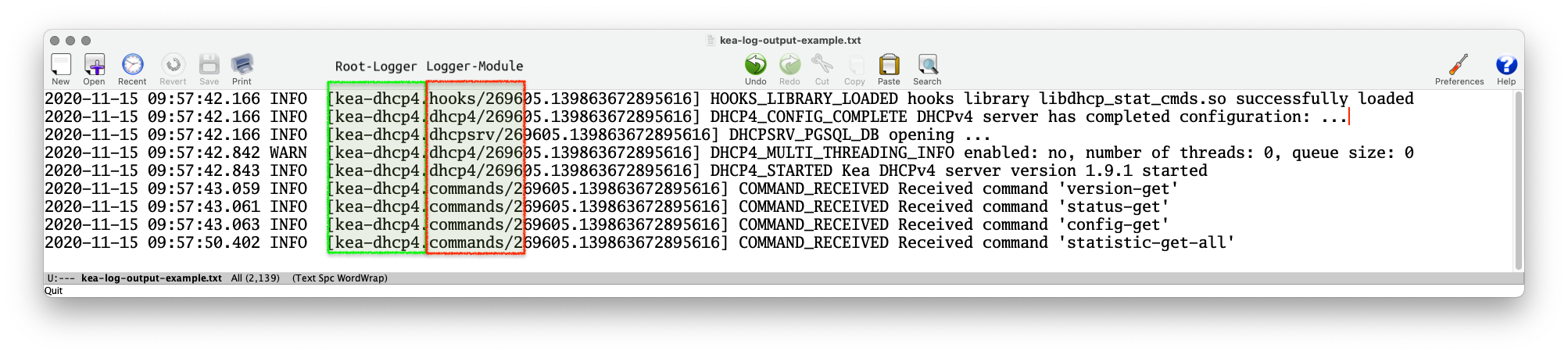
- The Kea Log-Messages are sent from different logging modules
- The logging modules create a logging hierarchy
- The Root-Logger is named after the Kea service process
- Below the Root-Logger are one or more logging modules that can be used to sent specific logging information to other log-targets, or change other logging parameters such as the severity
- The logging modules create a logging hierarchy
- A list of Loggers supported by Kea servers and hook-libraries can be found in the Kea documentation https://kea.readthedocs.io/en/latest/arm/logging.html#the-name-string-logger
6.4 Kea Logger
- The name of the logging module that created a log message can be found in the log output (when using the default log pattern for files)
6.5 Logging to syslog
- Using the
outputparameter ofsyslogwill sent the log messages of the chosen logger to the syslog daemon- If a different service name should be used for the syslog
messages, the service name can be specified in the format
syslog:name
- If a different service name should be used for the syslog
messages, the service name can be specified in the format
[...]
    "loggers": [{
        "name": "kea-dhcp4",
        "output_options": [
            { "output": "syslog:dhcp4" }
        ],
        "severity": "WARN", "debuglevel": 0
    }]
[...]
6.6 Logging to a file
- When logging to a file, the parameter
outputspecifies the file name- File rollover can be specified with the
maxsize(size of log-file in bytes) andmaxver(number of log-file generations)
- File rollover can be specified with the
6.7 Logging Message Format
- The content of the log messages can be controlled with the
patternoption- The
patternused for each message is described by a string containing one or more format components as part of a text string - In addition to the components the string may contain any other arbitrary text you find useful.
- The Log4Cplus documentation provides information on the
patternformat string: https://log4cplus.sourceforge.io/
- The
6.8 Logging Message Format
- Example: the pattern definition below …
{
   "output": "....",
   "pattern": "%D{%Y-%m-%d %H:%M:%S.%q} %-5p [%c/%i.%t] %m\n"
},
- … will create a log entry similar to this one:
2019-08-05 14:27:45.871 DEBUG [kea-dhcp4.dhcpsrv/8475.12345] DHCPSRV_TIMERMGR_START_TIMER starting timer: reclaim-expired-leases
6.9 Kea and Systemd Journal
- When a Kea service is running under control of
systemd, the logging output written tostdoutwill be stored in the systemd journal
[...]
    "loggers": [{
        "name": "kea-dhcp4",
        "output_options": [
            {
                "output": "stdout",
                "pattern": "%-5p %m\n"
            }
        ],
        "severity": "INFO",
        "debuglevel": 0
    }]
[...]
6.10 Kea and Systemd Journal
- Systemd-Journal entries can be queried with a filter language
- Easier than filtering through log files (if you don't know
awkandperl) systemd-journalddata can be sent via an encrypted and authenticated connection to a central systemd-journald log host- See the
journalctldocumentation for details
- Easier than filtering through log files (if you don't know
# journalctl --since today -u kea-dhcp4 --grep DHCP4_LEASE_ADVERT
-- Logs begin at Fri 2020-09-18 11:20:45 CEST, end at Sat 2020-11-14 09:24:50 CET. --
Nov 14 00:00:00 home01 kea-dhcp4[244218]: INFO  DHCP4_LEASE_ADVERT [hwtype=1 00:0d:93:29:2d:30], cid=[01:00:0d:93:29:2d:30], tid=0xfa7d9468: lease 192.0.2.114 will be a>
Nov 14 00:00:04 home01 kea-dhcp4[244218]: INFO  DHCP4_LEASE_ADVERT [hwtype=1 00:0d:93:29:2d:30], cid=[01:00:0d:93:29:2d:30], tid=0xe998dcab: lease 192.0.2.114 will be a>
Nov 14 00:05:13 home01 kea-dhcp4[244218]: INFO  DHCP4_LEASE_ADVERT [hwtype=1 2e:78:71:ca:da:26], cid=[no info], tid=0x8ddd0a71: lease 192.0.2.115 will be advertised
Nov 14 02:15:06 home01 kea-dhcp4[244218]: INFO  DHCP4_LEASE_ADVERT [hwtype=1 14:c2:13:ed:ba:fb], cid=[01:14:c2:13:ed:ba:fb], tid=0xda0e88bc: lease 192.0.2.23 will be ad>
Nov 14 04:16:09 home01 kea-dhcp4[244218]: INFO  DHCP4_LEASE_ADVERT [hwtype=1 14:c2:13:ed:ba:fb], cid=[01:14:c2:13:ed:ba:fb], tid=0xda0e88be: lease 192.0.2.23 will be ad>
Nov 14 06:01:03 home01 kea-dhcp4[244218]: INFO  DHCP4_LEASE_ADVERT [hwtype=1 14:c2:13:ed:ba:fb], cid=[01:14:c2:13:ed:ba:fb], tid=0xda0e88c0: lease 192.0.2.23 will be ad>
Nov 14 08:04:24 home01 kea-dhcp4[244218]: INFO  DHCP4_LEASE_ADVERT [hwtype=1 14:c2:13:ed:ba:fb], cid=[01:14:c2:13:ed:ba:fb], tid=0xda0e88c3: lease 192.0.2.23 will be ad>
6.11 Kea API authorization logging
- It is possible to restrict the Kea API commands to authorized users
- The authorization information will be logged with the
kea-ctrl-agent.httplogger:
- The authorization information will be logged with the
# ./kea-ctrl-agent -c simple.json
20.10.15 14:05:16.550 INFO  [kea-ctrl-agent.http/174909] HTTP_CLIENT_REQUEST_AUTHORIZED received HTTP request authorized for 'admin'
20.10.15 14:05:16.550 INFO  [kea-ctrl-agent.commands/174909] COMMAND_RECEIVED Received command 'list-commands'
6.12 Debug-Logging
- Quick option: start Kea DHCP4 in debug mode from the command
line. This will automatically enable the highest debugging level
- On a busy server, this will create too much debug information (see next slide for an alternative)
[kea-server]# systemctl stop kea-dhcp4
[kea-server]# kea-dhcp4 -d -c /etc/kea/kea-dhcp4.conf
6.13 Debug-Logging
- Alternative: enable debug logging on a specific logger only
    "loggers": [{
        "name": "kea-dhcp4",
        "output_options": [
            { "output": "syslog:dhcp4" }
        ],
        "severity": "WARN", "debuglevel": 0
        },{
        "name": "kea-dhcp4.flex-id-hooks",
        "output_options": [ {
            "output": "/var/log/kea/kea-dhcp4-flex-id.log"
        } ],
        "severity": "DEBUG",
        "debuglevel": 55
    } ]
[...]
6.14 Exercise: Real-World logging config
- Below is a Kea-DHCPv6 logging configuration taken from a real world installation.
- Implement a similar logging into your Kea-DHCP-Server
keaNNNa, check the configuration and reload the Kea-DHCP-Server - Request a lease from the client and inspect the log-files
"loggers": [
   {
     "name": "kea-dhcp6",
     "severity": "INFO",
     "output-options": [{
         "maxsize": 1048576,
         "maxver": 10,
         "output": "/var/log/kea/kea-dhcp6.log"
       }]
   },
   {
     "name": "kea-dhcp6.packets",
     "severity": "DEBUG",
     "debuglevel": 55,
     "output-options": [{
         "maxsize": 1048576,
         "maxver": 10,
         "output": "/var/log/kea/kea-dhcp6-packets.log"
       }]
   },
   {
     "name": "kea-dhcp6.eval",
     "severity": "DEBUG",
     "debuglevel": 55,
     "output-options": [{
         "maxsize": 10240000,
         "output": "/var/log/kea/kea-dhcp6-eval.log"
       }]
   },
   {
     "name": "kea-dhcp6.options",
     "severity": "INFO",
     "output-options": [{
         "maxsize": 10240000,
         "output": "/var/log/kea/kea-dhcp6-options.log"
       }]
   },
   {
     "name": "kea-dhcp6.commands",
     "severity": "INFO",
     "output-options": [{
         "maxsize": 10240000,
         "output": "/var/log/kea/kea-dhcp6-commands.log"
       }]
   },
   {
     "name": "kea-dhcp6.alloc-engine",
     "severity": "DEBUG",
     "debuglevel": 55,
     "output-options": [{
         "maxsize": 10240000,
         "output": "/var/log/kea/kea-dhcp6-alloc.log"
       }]
   },
   {
     "name": "kea-dhcp6.dhcp6",
     "severity": "INFO",
     "output-options": [{
         "maxsize": 10240000,
         "output": "/var/log/kea/kea-dhcp6-dhcp6.log"
       }]
   },
   {
     "name": "kea-dhcp6.stat-cmds-hooks",
     "severity": "INFO",
     "output-options": [{
         "maxsize": 10240000,
         "output": "/var/log/kea/kea-dhcp6-stat-cmds-hooks.log"
       }]
   }
   ]
7 Info: Forensic/Legal Logging
- The Forensic Logging hook library provides hooks that record a detailed log of assignments, renewals, releases, and other lease events into a set of log files or SQl databases
- With forensic logging, a specific log format can be created
- This is useful if security appliances (such as SIEM systems) require a specific log-format to be present
- Adding the forensic logging hook-library to the Kea-DHCPv6 configuration:
{ "Dhcp6": { "hooks-libraries": [ { "library": "/usr/lib/x86_64-linux-gnu/kea/hooks/libdhcp_legal_log.so", "parameters": { "path": "/var/log/kea", "base-name": "kea-forensic6" } }, [...] - Example of custom output format. Unfortunatly Kea-DHCP expressions
must be given in one line (restriction of JSON). There is an open
feature request for concatenate format strings and client-class
tests from JSON arrays of strings: https://gitlab.isc.org/isc-projects/kea/-/issues/3994)
"request-parser-format": "ifelse(pkt6.msgtype == 8 or pkt6.msgtype == 9, ifelse(option[3].option[5].exists, 'Address: ' + addrtotext(substring(option[3].option[5].hex, 0, 16)) + ' has been released from a device with DUID: ' + hexstring(option[1].hex, ':') + ifelse(relay6[0].peeraddr == '', '', ' connected via relay at address: ' + addrtotext(relay6[0].peeraddr) + ' for client on link address: ' + addrtotext(relay6[0].linkaddr) + ifelse(relay6[0].option[37].exists, ', remote-id: ' + hexstring(relay6[0].option[37].hex, ':'), '') + ifelse(relay6[0].option[38].exists, ', subscriber-id: ' + hexstring(relay6[0].option[38].hex, ':'), '') + ifelse(relay6[0].option[18].exists, ', connected at location interface-id: ' + hexstring(relay6[0].option[18].hex, ':'), '')), '') + ifelse(option[25].option[26].exists, 'Prefix: ' + addrtotext(substring(option[25].option[26].hex, 9, 16)) + '/' + uint8totext(substring(option[25].option[26].hex, 8, 1)) + ' has been released from a device with DUID: ' + hexstring(option[1].hex, ':') + ifelse(relay6[0].peeraddr == '', '', ' connected via relay at address: ' + addrtotext(relay6[0].peeraddr) + ' for client on link address: ' + addrtotext(relay6[0].linkaddr) + ifelse(relay6[0].option[37].exists, ', remote-id: ' + hexstring(relay6[0].option[37].hex, ':'), '') + ifelse(relay6[0].option[38].exists, ', subscriber-id: ' + hexstring(relay6[0].option[38].hex, ':'), '') + ifelse(relay6[0].option[18].exists, ', connected at location interface-id: ' + hexstring(relay6[0].option[18].hex, ':'), '')), ''), '')",
"response-parser-format": "ifelse(pkt6.msgtype == 7, ifelse(option[3].option[5].exists and not (substring(option[3].option[5].hex, 20, 4) == 0), 'Address: ' + addrtotext(substring(option[3].option[5].hex, 0, 16)) + ' has been assigned for ' + uint32totext(substring(option[3].option[5].hex, 20, 4)) + ' seconds to a device with DUID: ' + hexstring(option[1].hex, ':') + ifelse(relay6[0].peeraddr == '', '', ' connected via relay at address: ' + addrtotext(relay6[0].peeraddr) + ' for client on link address: ' + addrtotext(relay6[0].linkaddr) + ifelse(relay6[0].option[37].exists, ', remote-id: ' + hexstring(relay6[0].option[37].hex, ':'), '') + ifelse(relay6[0].option[38].exists, ', subscriber-id: ' + hexstring(relay6[0].option[38].hex, ':'), '') + ifelse(relay6[0].option[18].exists, ', connected at location interface-id: ' + hexstring(relay6[0].option[18].hex, ':'), '')), '') + ifelse(option[25].option[26].exists and not (substring(option[25].option[26].hex, 4, 4) == 0), 'Prefix: ' + addrtotext(substring(option[25].option[26].hex, 9, 16)) + '/' + uint8totext(substring(option[25].option[26].hex, 8, 1)) + ' has been assigned for ' + uint32totext(substring(option[25].option[26].hex, 4, 4)) + ' seconds to a device with DUID: ' + hexstring(option[1].hex, ':') + ifelse(relay6[0].peeraddr == '', '', ' connected via relay at address: ' + addrtotext(relay6[0].peeraddr) + ' for client on link address: ' + addrtotext(relay6[0].linkaddr) + ifelse(relay6[0].option[37].exists, ', remote-id: ' + hexstring(relay6[0].option[37].hex, ':'), '') + ifelse(relay6[0].option[38].exists, ', subscriber-id: ' + hexstring(relay6[0].option[38].hex, ':'), '') + ifelse(relay6[0].option[18].exists, ', connected at location interface-id: ' + hexstring(relay6[0].option[18].hex, ':'), '')), ''), '')"
8 Monitoring with Uptime-Kuma
- Uptime-Kuma is a simple monitoring application
- Homepage https://uptime.kuma.pet
- It can be used to monitor Kea-DHCP using the Kea-DHCP-API
8.1 Installing Uptime-Kuma as a Container
- Work on the DHCP-Client machine
[dhcp]% apt install podman
[dhcp]% podman run -d --restart=always -p 3001:3001 \
   -v uptime-kuma:/app/data \
   --name uptime-kuma docker.io/louislam/uptime-kuma
- Login to Uptime-Kuma and set a personalized password at
http://dhcpNNN.dane.onl- In production environments, Uptime-Kuma should be installed behind a reverse proxy with TLS transport encryption
- Select
Add new Monitorto create a new monitoring configuration- Type: "HTTP(s)"
- Friendly name: "Kea-DHCP availability"
- URL: =https://keaNNNa.dane.onl:8005
- Select
Certificate Expiry Notification - HTTP Options/Body
{ "command": "version-get" } - Authentication/Method: HTTP Basic Auth with the configured user-name and password of the Kea-DHCP API
- Save the new monitor
- The monitor should be "green" (working)
- Stop the Kea-DHCPv6-Server on
keaNNNa - The Monitoring should switch to "red"
8.2 Kea-DHCP HA-Monitoring
- Select
Add new Monitorto create a new monitoring configuration- Type: "HTTP(s) - Keyword"
- Friendly name: "Kea-DHCP HA Status OK"
- URL: =https://keaNNNa.dane.onl:8005
- Keyword:
"partner-down" - Select Certificate Expiry Notification
- Select Upside Down Mode
- HTTP Options/Body
{ "command": "ha-heartbeat" } - Authentication/Method: HTTP Basic Auth with the configured user-name and password of the Kea-DHCP API
- Save the new monitor
- The monitor should be "green" (working)
- Stop the Kea-DHCPv6-Server on
keaNNNb - The Monitoring should switch to "red"
9 Monitoring DHCP-Pool utilization with Prometheus and Grafana
- On the Kea-Servers
keaNNNaandkeaNNNb, add thelibdhcp_stat_cmds.sohooks{ "library": "/usr/lib/x86_64-linux-gnu/kea/hooks/libdhcp_stat_cmds.so" }, - Create a basic Prometheus configuration
[dhcp]% mkdir -p /etc/prometheus
- Content of
/etc/prometheus/prometheus.ymlglobal: scrape_interval: 60s evaluation_interval: 120s scrape_configs: - job_name: prometheus static_configs: - targets: ['localhost:9090'] - Installing Prometheus as a Podman Container to run on Port 9090:
[dhcp]% apt install podman
[dhcp]% podman run -d --name prometheus -p 9090:9090 \
   -v /etc/prometheus/prometheus.yml:/etc/prometheus/prometheus.yml \
   docker.io/prom/prometheus
- Install Grafana as a Podman Container to run on Port 3000 (in
production environments, Grafana should be installed behind a
secured reverse proxy):
[dhcp]% podman run -d --name grafana -p 3000:3000 docker.io/grafana/grafana
- Login to the Grafana Web-UI at
http://dhcpNNN.dane.onl:3000with usernameadminand passwordadmin - Add a new datasource of type
prometheusfronhttp://dhcpNNN.dane.onl:9090 - On machine
keaNNNa, change the Stork-Agent configuration so that the agent exports Prometheus metrics:[...] ### settings for exporting stats to Prometheus ### the IP or hostname on which the agent exports Kea statistics to Prometheus STORK_AGENT_PROMETHEUS_KEA_EXPORTER_ADDRESS=<ip-of-keaNNNa.dane.onl> ### the port on which the agent exports Kea statistics to Prometheus STORK_AGENT_PROMETHEUS_KEA_EXPORTER_PORT=8006 ## enable or disable collecting per-subnet stats from Kea STORK_AGENT_PROMETHEUS_KEA_EXPORTER_PER_SUBNET_STATS=true [...]
- Restart the Stork-Agent and make sure it is still running
- See the prometheus metrics page with a Web-Browser at http://keaNNNa.dane.onl:8006/metrics
- Add the "scraper" for the Stork-Agent to the prometheus config file
at
/etc/prometheus/prometheus.yml[...] # statistics from Kea - job_name: 'kea' static_configs: - targets: - 'keaNNNa.dane.onl:8006' - Check the Prometheus configuration file syntax
[dhcp]% podman exec prometheus promtool check config /etc/prometheus/prometheus.yml
- Restart the Prometheus Container
[dhcp]% podman restart prometheus
- Import the Kea-DHCPv6 Dashboard into Grafana (from https://gitlab.isc.org/isc-projects/stork/-/blob/master/grafana/kea-dhcp6.json), relace the datasource "uid" of "PBFA97CFB590B2093" with the datasource "uid" in your Grafana instance (probably 'prometheus')
- See the metrics data coming into the Grafana dashboard
10 Monitoring with Zabbix
- On the VM
dhcpNNN, stop and remove the Promethus, Grafana and Uptime-Kuma container (if running, check withpodman ps)[dhcp]% podman stop uptime-kuma [dhcp]% podman stop grafana [dhcp]% podman stop prometheus [dhcp]% podman rm uptime-kuma [dhcp]% podman rm grafana [dhcp]% podman rm prometheus
- Download the Zabbix 'Pod' install script (Zabbix Out-of-the-Box)
[dhcp]% wget https://raw.githubusercontent.com/diasdmhub/Zabbix_Out_of_The_Box/refs/heads/main/pod/zabbixpod.sh
- Execute the script (the script is good for this workshop
environment. If you want to use it in production, do your own
security audit!)
[dhcp]% bash ./zabbixpod.sh
- Login to your Zabbix-Server on
dhcpNNN.dane.onl:8080with username 'Admin' and password 'zabbix', set a personalized password under User Settings
10.0.1 Kea-DHCP Monitoring using HTTP agent
- Under "monitoring>Hosts", create a new host for
keaNNNa.dane.onlin the "Host Group" ofdhcp - Select the conext-menu on the
keaNNNa.dane.onlhost, select "Items" - Create a new item
- Name:
Kea-DHCP - Type:
HTTP Agent - Key:
keaNNNa-dhcp-HA - Type of information:
Text - URL:
https://keaNNNa.dane.onl:8005/ - Request type:
POST - Request body type:
JSON data - Request body:
{ "command": "ha-heartbeat" } - Convert to JSON: X
- HTTP authentication:
Basic - User name: Username configured for the API socket of the Kea-DHCP Server
- Password: password configured for the API socket of the Kea-DHCP Server
- SSL verify peer: X
- Name:
- Create a "Preprocessing" step
- Name:
JSON Path - Parameters:
$[0].arguments.state(will fetch the current HA state from the server) - Test and save preprocessing
- Name:
- Test and save the "item"
- Create a 'Trigger'
- Name:
Kea-DHCP-HA-Broken - Severity:
High - Expression:
find(/keaNNNa.dane.onl/kea-dhcp-version,,,"partner-down")=1 - Enabled: X
- Name:
- Save "Trigger"
- Go to the Zabbix Main Dashboard
- Stop the Kea-DHCPv6-Service on
keaNNNb.dane.onl - Watch the Monitoring Message appear in the "Problems by severity" panel on the Dashboard