Kea DHCP
High-Availability options
Carsten Strotmann and the ISC Kea Team
Created: 2025-11-12 Wed 08:12
In this Chapter
- High-Availability Options
- Split/Shared Pool
- Pure static DHCP
- Shared Database
- Kea High-Availability Cluster
High Availability
DHCP High-Availability
- DHCP is a critical resource in most networks
- If the DHCP service is down, machines and computers cannot join the network
- DHCP administrators like to make the DHCP service redundant and high-available
Kea High-Availability options
- Kea DHCP supports different high availability (HA) options
- Some require only configuration changes
- Other require the (free) HA hook
- Kea does not support the standardized DHCPv6 fail-over protocol
(RFC 8156 "DHCPv6 Failover Protocol")
https://tools.ietf.org/html/rfc8156@@html:%3C/div%3E@@
- It supports a HA implementation that aligns with the Kea software design and covers most use-cases
DHCPv6 Split Pool / Shared Pool
- The DHCPv6 split pool or shared pool HA solution are independent from the DHCPv6 server implementation
- These HA solutions do not require any synchronization between the DHCP server
- These solutions make use of the vast address space available in one IPv6 /64 subnet
- These solutions are not good solutions for DHCPv4, because the address space in IPv4 is too small
DHCPv6 Split Pool
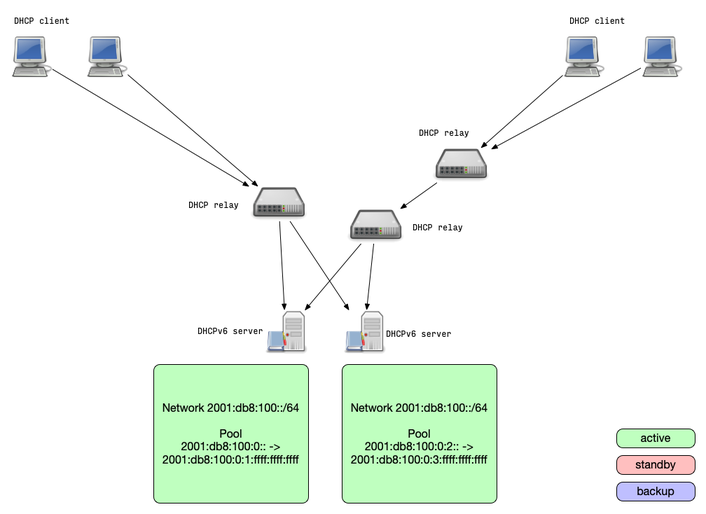
- Split-Pool: because one IPv6 /64 is so large, it usually can be
split in two parts that are served by two independent DHCPv6 servers
- The pools are not overlapping, it is impossible that the two DHCPv6 servers will return the same lease address to different clients
- If one DHCPv6 server stops responding, the clients will receive a new lease from the remaining DHCPv6 server (after lease expiry)
DHCPv6 Split Pool
DHCPv6 Shared Pool
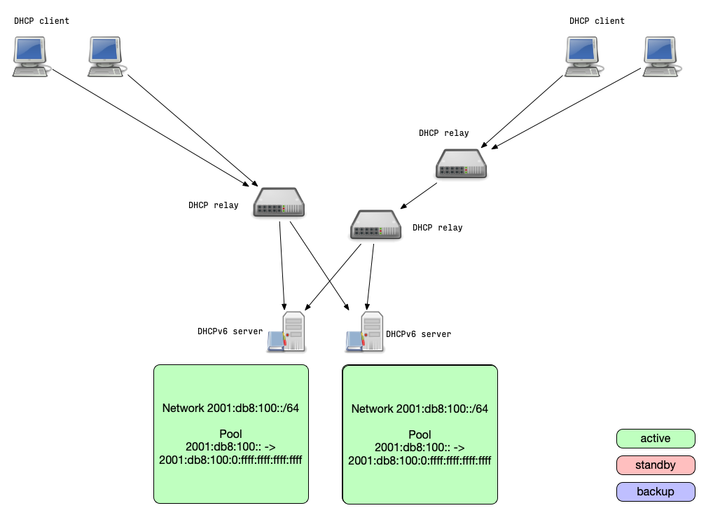
- Shared-Pool: two DHCPv6 server are authoritative for the same
addresses from a pool
- Because of the size of one IPv6 /64 subnet, the chance that both
servers give out the same address to different clients is
statistically very low
- And if they did, IPv6 duplicate address detection (DAD) will cover this rare edge case
- If one DHCPv6 server stops responding, the clients will receive a new lease from the remaining DHCPv6 server (after lease expiry)
- Because of the size of one IPv6 /64 subnet, the chance that both
servers give out the same address to different clients is
statistically very low
DHCPv6 Shared Pool
IPv4/IPv6 pure static DHCP
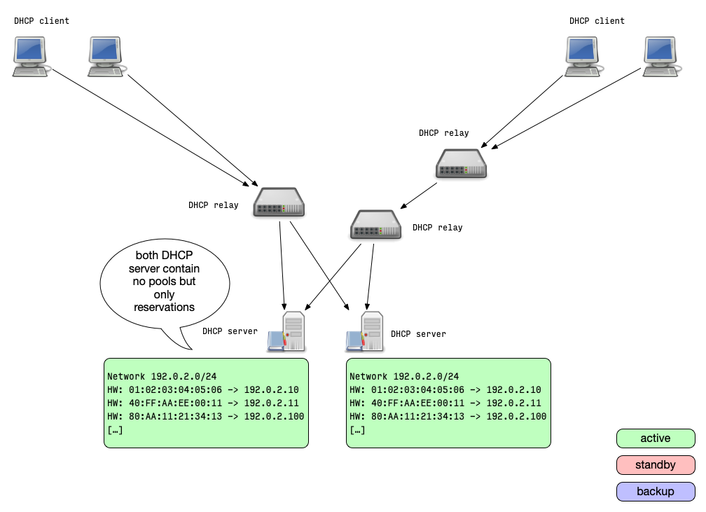
- The pure static solution also works with any DHCP server, in IPv4
and IPv6 networks
- The idea is to not use dynamic allocation of addresses, but only static reservations
- Two or more DHCP server are equipped with the same reserveration configuration
- Each server will always return the same IP address lease to the same client
- This solution requires an out-of-band synchronization of the
reservation
- This could be done on the database level with a shared host reservation database
IPv4/IPv6 pure static DHCP
IPv4/IPv6 shared database
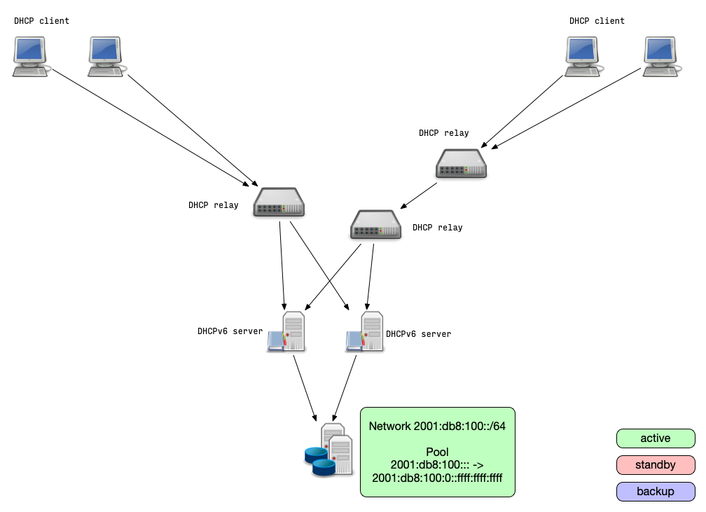
- The shared database solution moves the redundancy to the database
level
- This solutions allows high availability with more than two DHCP server nodes
- Two or more DHCP server are connected to the same (logical) database containing the lease information
- The database itself should be made high available
- All DHCP servers read and write lease information from/to the same database
- Database locking can lead to performance degradation(!) on high rate of leases/renewals
IPv4/IPv6 shared database
High Availability Hook
- Using the Kea DHCP High-Availability extension (HA hook) is the most feature rich high availability solution
- The HA hook offers different operation modes
- Load-balancing: all DHCP server are active and return leases
- Hot-standby: all DHCP server are in sync but only one is active and returns leases
- Passive-backup: one DHCP server is active and send lease database updates to a number of backup servers.
Kea HA Mode: load-balancing
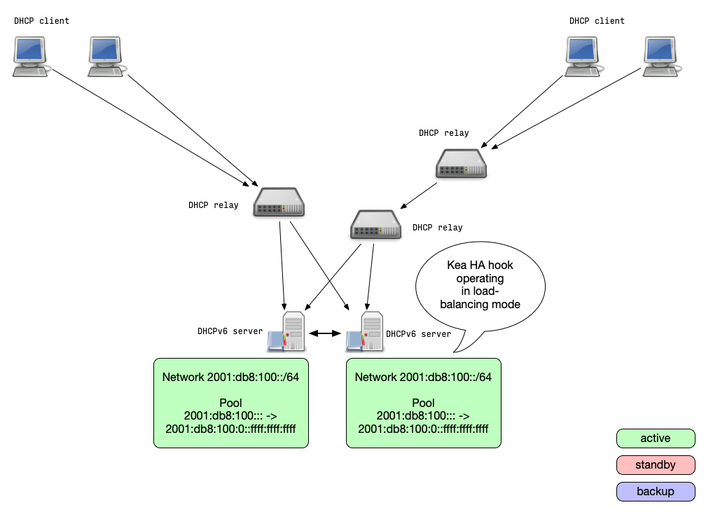
- When operating in load-balancing mode, two Kea DHCP server are
active and respond to lease requests
- The lease information is synced between the Kea DHCP HA servers
- The pools are split 50/50 between the two DHCP servers
- Every DHCP server can take over the full service if needed
- Via the HA protocol a DHCP HA node will detect if one partner
node is down and takes over the service
- Once the partner is online again, the lease database is synced
Kea HA Mode: load-balancing
Kea HA Mode: hot-standby
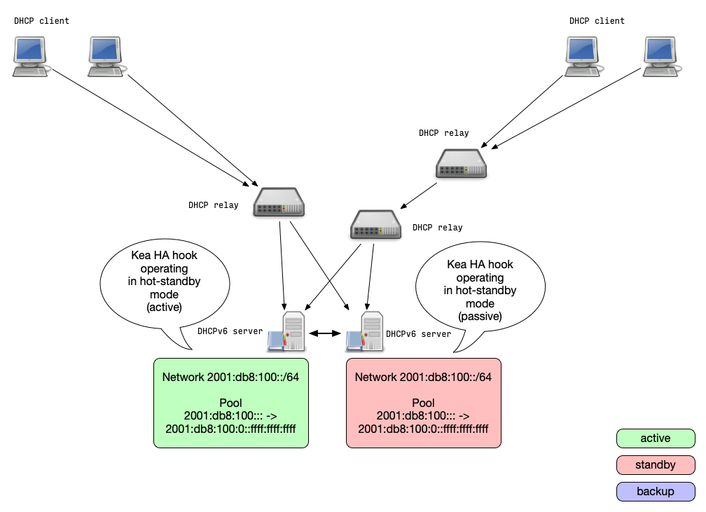
- A Kea DHCP cluster configured for the hot-standby mode will have
the primary node serving DHCP clients and another node (secondary)
only receiving the lease-database updates, but not serving clients
- If the secondary server detects the failure of the primary, it starts responding to all DHCP queries
Kea HA Mode: hot-standby
Kea HA Mode: hub-and-spoke
- In an hub-and-spoke configuration one (central) Kea-DHCP server provides backup for a number of active (satellite) Kea-DHCP server
- The satellite Kea-DHCP server are often located in branch-offices
- The backup central Kea-DHCP is often located at the organizations head-quarter (HQ)
- Hub-and-spoke mode is available since Kea-DHCP 3.0
Kea HA Mode: Backup Servers
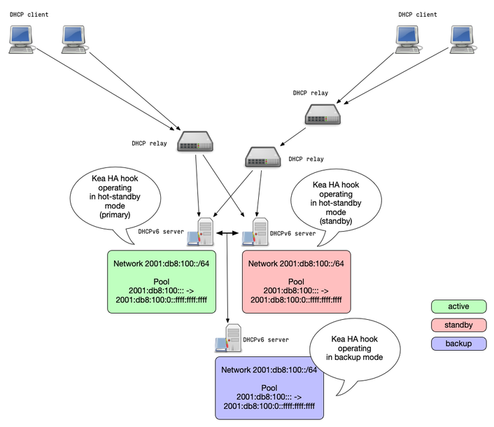
- Kea DHCP supports any number of backup servers
- Backup server receive lease database updates but are not an active part of an HA setup
- Backup server can be deployed in addition to the other Kea HA modes
Kea HA Mode: Backup Server
Kea HA Mode: passive-backup
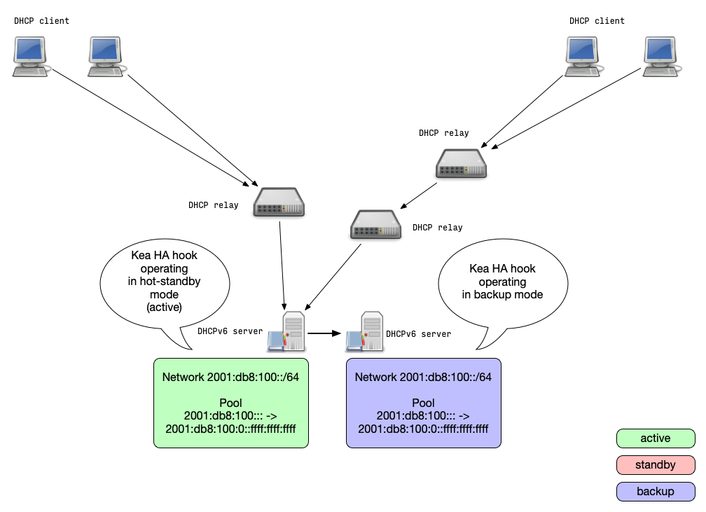
- In the passive-backup configuration, only one Kea server is
active and is serving leases to the clients
- Any number of passive (not answering to clients) backup servers receive lease database backups
- Since Kea 1.7.8, the active server does not need to wait for a
lease update confirmation from the backup servers before giving
the lease to a client
- This reduces the latency compared to the other HA modes
- In case of an failure of the active server, a backup server needs
to be manually promoted to be active
- This could be automated outside of Kea with API calls from a monitoring system
Kea HA Mode: passive-backup
Example Configuration: Kea DHCP Failover Cluster
Kea HA Configurations
- The Kea HA configuration parts are symmetric, all HA peers can
share an almost identical configuration file
- The only difference in the HA configuration is the
this-server-nameparameter
- The only difference in the HA configuration is the
- The HA mode is selected with the
modeparameter
Example Load-Balancing Configuration
"Dhcp4": {
    "hooks-libraries": [{
        "library": "/usr/lib/kea/hooks/libdhcp_lease_cmds.so", "parameters": { }
    }, {
        "library": "/usr/lib/kea/hooks/libdhcp_ha.so", "parameters": {
            "high-availability": [{
                "this-server-name": "server1",
                "mode": "load-balancing",
                "heartbeat-delay": 10000, "max-response-delay": 40000, "max-ack-delay": 5000,
                "max-unacked-clients": 5,
                "peers": [{
                    "name": "server1",
                    "url": "http://192.0.2.33:8000/",
                    "role": "primary", "auto-failover": true
                }, {
                    "name": "server2",
                    "url": "http://192.0.2.66:8000/",
                    "role": "secondary", "auto-failover": true
                }, {
                    "name": "server3",
                    "url": "http://192.0.2.99:8000/",
                    "role": "backup",
                    "basic-auth-user": "foo", "basic-auth-password": "bar",
                    "auto-failover": false
                }]
            }]
        }
    }],
[...]
Example Hot-Standby Configuration
"Dhcp4": {
    "hooks-libraries": [{
        "library": "/usr/lib/kea/hooks/libdhcp_lease_cmds.so",  "parameters": { }
    }, {
        "library": "/usr/lib/kea/hooks/libdhcp_ha.so", "parameters": {
            "high-availability": [{
                "this-server-name": "server1",
                "mode": "hot-standby",
                "heartbeat-delay": 10000, "max-response-delay": 40000,
                "max-ack-delay": 5000,    "max-unacked-clients": 5,
                "peers": [{
                    "name": "server1",
                    "url": "http://192.0.2.33:8000/",
                    "role": "primary", "auto-failover": true
                }, {
                    "name": "server2",
                    "url": "http://192.0.2.66:8000/",
                    "role": "standby", "auto-failover": true
                }, {
                    "name": "server3",
                    "url": "http://192.0.2.99:8000/",
                    "basic-auth-user": "foo",  "basic-auth-password": "bar",
                    "role": "backup",  "auto-failover": false
                }]
            }]
        }
    }],
    [...]
Kea HA Maintenance
Sending control commands to the Kea HA Module
- As many other parts of the Kea system, the HA module can be
controlled over the network with the REST-API
- It receives commands in JSON format via the Kea Control Agent (CA)
- The following slides give examples of useful API commands
- More commands and details can be found in the Kea Reference
Manual
https://kea.readthedocs.io/en/latest/arm/hooks.html#control-commands-for-high-availability@@html:%3C/div%3E@@
Database synchronization
- The
ha-synccommand triggers the server to sync the lease database with the selected peer
{   "command": "ha-sync",
    "service": [ "dhcp4 "],
    "arguments": {
        "server-name": "server2",
        "max-period": 60
    }
}
Retrieving the HA status
The command
ha-heartbeatcan be used to check the current state of a Kea DHCP server HA node{ "service": [ "dhcp4" ], "command": "ha-heartbeat" }The returned JSON structure describes the current DHCP server state
{
  "result": 0,
  "text": "HA peer status returned.",
  "arguments":
    {
        "state": "partner-down",
        "date-time": "Thu, 07 Nov 2019 08:49:37 GMT"
    }
}
Fetching the HA configuration
- With the
status-getcommand, the administrator can request the current HA configuration from a Kea DHCP server node
{
    "result": 0,
    "text": "",
    "arguments": { "pid": 1234,
                   "uptime": 3024,
                   "reload": 1111,
                   "high-availability": [{
                     "ha-mode": "load-balancing",
                     "ha-servers": {
                        "local": {
                          "role": "primary",
                          "scopes": [ "server1" ],
                          "state": "load-balancing" },
                    "remote": {
                        "age": 10,
                        "in-touch": true,
                        "role": "secondary",
                        "last-scopes": [ "server2" ],
   [...]
                        "analyzed-packets": 8 }
                }}],
        "multi-threading-enabled": true,
        "thread-pool-size": 4,
        "packet-queue-size": 64
    }
}
Controlling Maintenance Mode
- Before removing a Kea DHCP server from a HA setup, the server
should be set into maintenance mode
- The commands
ha-maintenance-startandha-maintenance-cancelcommands can be use to bring a server in or out of maintenance mode
- The commands
Decision tree for production systems
"so many options, which should I implement?"
- Kea offers many different high-availability options
- For an user new to Kea or DHCP administration, this can be a hard choice
- The next slides give some general recommendations and guidance on how to select an high-availability option for a Kea deployment
Load-balancing vs. hot-standby
- As the name implies, in the load-balancing mode the load is
distributed across both active DHCP servers
- With complex client classing rules, this can be faster than a single active server
- The load-balancing mode requires a 50/50 split of the pools across both HA server nodes
- The hot-standby mode is simpler
- Only one active server, one active log file for trouble shooting
- No split pools required
HA Module vs. shared database
- A shared database setup offers redundancy for more than two active DHCP servers
- In a shared database setup, two clients might be offered the same
IP address
- One will succeed, the other will get a DHCPNAK from the server and has to start the DHCP process again.
- The HA module works with the memfile lease database, which offers better performance most of the time compared to an SQL database
HA Module vs. split/shared Pool
- Split- or shared pools only work well with DHCPv6
- These are good options for IPv6-only networks
- Split- or shared pools are simple and easy to maintain
- The HA module is more universal
- It works for DHCPv4 and DHCPv6 and across all supported lease file storage back ends (memfile and SQL-Database)
- The